Creative Communities of the World Forums

The peer to peer support community for media production professionals.

Activity Forums Maxon Cinema 4D Snapping an Object to Position data of Clones

  • Snapping an Object to Position data of Clones

    Posted by Kevin Camin on January 25, 2012 at 12:05 am

    I’ve created a simple Cloner Object set-up. Now I want to be able to attach a cube to the position of one of the clones.

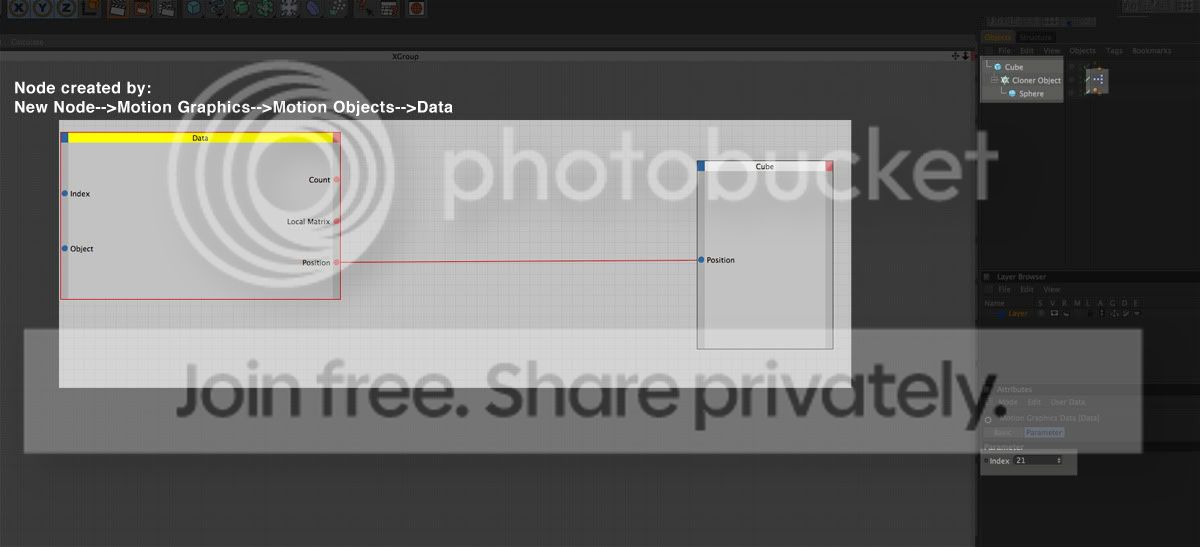
    I’m stuck. So far I’ve added an Xpresso Tag to the Cloner Object. Opened up Xpresso and added a Data node from the menu: New Node–>Motion Graphics–>Motion Objects–>Data.

    I dragged my cube into XPresso. I created a Position Out on the Data Node and a Position In on the Cube’s node and connected them.

    I clicked on the Data Node and in the Attributes Manager there is an Index option in the parameters that I assume would allow me to choose the clone to assign.

    Not working. Any help would be appreciated. You can click on my screen grab a few times to get a bigger look if you like. Thanks so much.
    Best regards,

    Kevin Camin

    Kevin Camin replied 14 years, 6 months ago 2 Members · 3 Replies
  • 3 Replies
  • Brian Jones

    January 25, 2012 at 12:14 am

    drag the cloner in to the xpresso window and open the Object port on it and link it to the input Object port on the data node (the data needs to know which cloner it’s supposed to be listening to)

  • Kevin Camin

    January 25, 2012 at 12:19 am

    Someone helped me figure it out. If anyone else is curious I just dragged in the Cloner Object into Xpresso and created an ‘Object’ output for it, and connected it to the Data Node’s Object input.

    Best regards,

    Kevin Camin

  • Kevin Camin

    January 25, 2012 at 12:19 am

    Thanks Brian. We were typing at the same time. 😉

    Best regards,

    Kevin Camin

We use anonymous cookies to give you the best experience we can.
Our Privacy policy | GDPR Policy