Creative Communities of the World Forums

The peer to peer support community for media production professionals.

Activity Forums Maxon Cinema 4D Smoothing edges on extruded splines? / simplify splines

  • Smoothing edges on extruded splines? / simplify splines

    Posted by Joe Roberts on August 6, 2021 at 1:36 pm

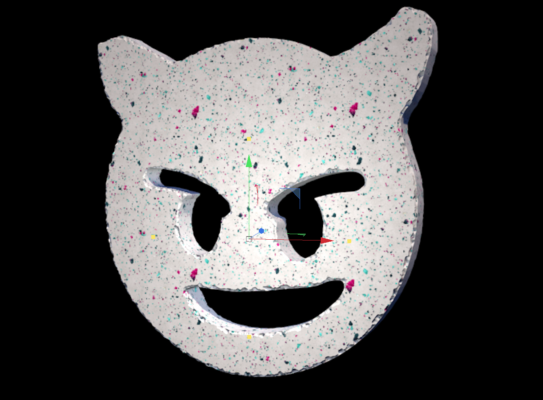
    Hi, I’m quite new to C4D and I have built this model by extruding splines made in Illustrator.

    Because of the number of points on the spline, the sides of the extrusion are full of these steps ( most visible once i add materials and lights). How can I smooth these? I’ve tried to simplify the splines but I want to replicate the shape closely and so this hasnt worked well for me. Is there a way i can reduce the points on the splice without changing the shape? Or can I smooth these steps once the spline has been extruded.

    I’ve attached screen shots.

    Thank you!

    Jim Scott replied 4 years, 9 months ago 2 Members · 2 Replies
  • 2 Replies
  • Joe Roberts

    August 6, 2021 at 1:37 pm
  • Jim Scott

    August 6, 2021 at 2:06 pm

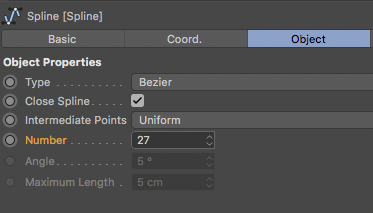
    To smooth the extrusion you want the steps to be closer together, so you actually want to increase the number of points in the spline, not reduce them. To do so in C4D, increase the “Number” setting in the spline’s attributes until you get the desired result.

    (And it looks like you found the “cubic” option)

We use anonymous cookies to give you the best experience we can.
Our Privacy policy | GDPR Policy