Creative Communities of the World Forums

The peer to peer support community for media production professionals.

Activity Forums Adobe After Effects Single layer missing eyeball switch

  • Single layer missing eyeball switch

    Posted by Daniel Siddall on August 15, 2024 at 9:20 pm

    I have seen all the questions and answers about the Eyeball Switch being missing and the answer being about “…right click next to ‘layer name’, then ‘Columns’ > ‘AV Features’…”

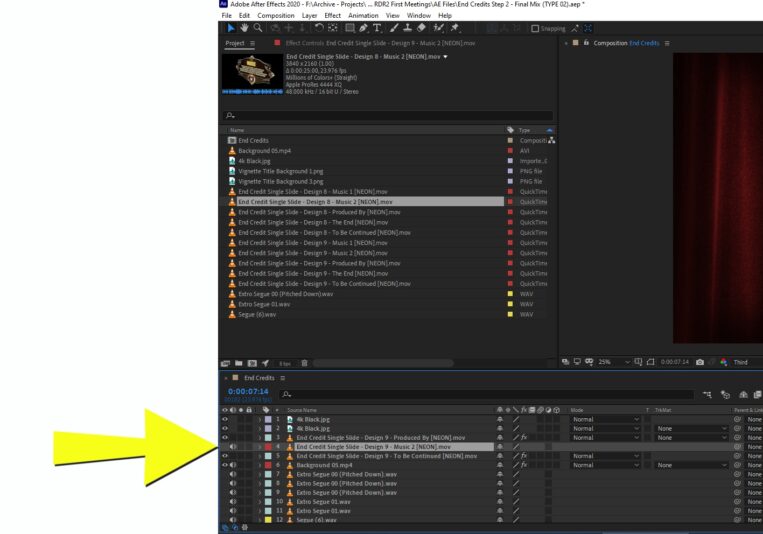
    But I have just a single video layer that has no eyeball switch. It’s also missing the FX, Mode, Trackmat and other boxes.

    I have Purged Memory and Disk Cache. I have rebooted. If I pull up an Auto-Save of the same project file, it still happens.

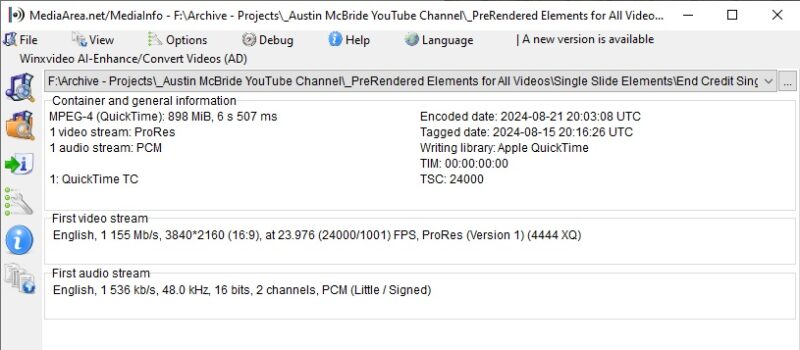
    The video in question is fine. It plays just lke all the others and is the same format (codec) as the others.

    Any ideas?

    Daniel Siddall replied 1 year, 9 months ago 2 Members · 2 Replies
  • 2 Replies
  • Chris Voelz

    August 16, 2024 at 12:01 pm

    It’s seeing it as an audio only layer. Maybe try right clicking on the file in your project panel and selecting interpret, see if the video portion is turned on. Otherwise if it plays fine from file explorer maybe re-import it to the project. Something is causing AE from recognizing the video track.

  • Daniel Siddall

    August 16, 2024 at 10:10 pm

    Thanks for your reply. I will try that.

We use anonymous cookies to give you the best experience we can.
Our Privacy policy | GDPR Policy