

Activity › Forums › Adobe After Effects Expressions › Shifting position of subheading text box depending on length of heading text
-
Shifting position of subheading text box depending on length of heading text
Posted by Helen Frost on August 6, 2026 at 11:37 amHi CC Community,
I’m making a MOGRT where there needs to be a heading and a subheading, and both are in text boxes.
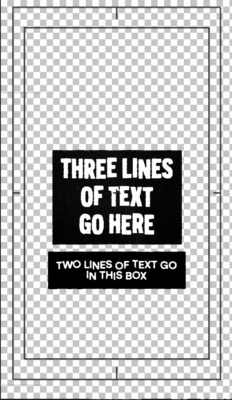
I need help writing expression(s) to shift the position of the subheading box depending on the number of lines of text in the heading box so the distance between the heading and subheading boxes remain the same.
Screen shot of the two boxes below:
Any help on this one would be greatly appreciated!
Thank you,
Helen
 Helen Frost replied 1 month, 1 week ago 2 Members · 7 Replies
 -
7 Replies
-

John Cuevas
August 6, 2026 at 1:15 pmAre the boxes being generated by the position of the text, using sourceRectAtTime ?
-

Helen Frost
August 6, 2026 at 1:21 pmThanks for getting back to me John.
Yes, here are the expressions I have in each text box’s rectangle path properties:
For the size, I’ve used this expression:
margin = 40
b = thisComp.layer(‘SUBHEADING TEXT’);
w = b.sourceRectAtTime(time-b.inPoint,true).width;
h= b.sourceRectAtTime(time-b.inPoint,true).height;
x= w + margin*2;
y = h + margin*2;
[x,y]
For the position I’ve used this expression:
margin = 50
margin = 40
b = thisComp.layer(‘SUBHEADING TEXT’);
w = b.sourceRectAtTime(time-b.inPoint,true).width;
h= b.sourceRectAtTime(time-b.inPoint,true).height;
text_height = (h + margin*2);
[0, text_height/2]
-
John Cuevas
August 6, 2026 at 2:01 pmI rebuilt some of the expressions using width and height pad sliders, rather than a fixed margin on the box sizes. The anchor points for everything have to be centered.
To create the fixed gap, I added an expression to the position of the Subhead Box, using the sourceRectAtTime command to references the bottom of the Heading box. I added a gap slider to the subhead box, so you can adjust that width easier.
Lastly, I parented the Subheading text to the SUBHEADING BOX, 0,0 out the position and it’s stays with the SUBHEADING BOX.
If you are building a motion template, you might want to delete all the expression sliders and just enter fixed values if you don’t want people messing with them.
You can see everything in the example project.
-
Helen Frost
August 6, 2026 at 2:22 pmThis is brilliant, thanks so much for this! Really appreciate the help 🙂
-
Helen Frost
August 6, 2026 at 3:20 pmHello again,
I’ve just noticed there’s an issue with the subheading text layer – it seems to misalign with the box when more text is added. Do you know why this might be?
Thanks,
Helen
-
John Cuevas
August 6, 2026 at 6:03 pmIt’s happening because when you add or subtract text from the textbox, the text layer’s anchor point doesn’t move when the amount of text changes. So I updated the project, on the subtext’s anchor point, I added an expression:
r = sourceRectAtTime(time, false);
[
r.left + r.width/2,
r.top + r.height/2
]
This will recenter the anchor point no matter how much text you put in the SubBox.
I parented the SUBHEADING TEXT to the SUBHEADING BOX, the 0,0 the position. This way, if you have some ascenders or decenders, you can just offset the Y value of the position to make it more visually centered.
In the new example project, I offset it just so you could see the adjustment.
-
Helen Frost
August 7, 2026 at 10:53 amAhhh, that makes sense. Thank you again for taking the time to help, this is extremely useful!
Reply to this Discussion! Login or Sign Up