Creative Communities of the World Forums

The peer to peer support community for media production professionals.

Activity Forums DaVinci Resolve Settings button is greyed out for ResolveFX Sharpen

  • Settings button is greyed out for ResolveFX Sharpen

    Posted by Stefan Spinu on September 28, 2020 at 5:56 pm

    Hi,

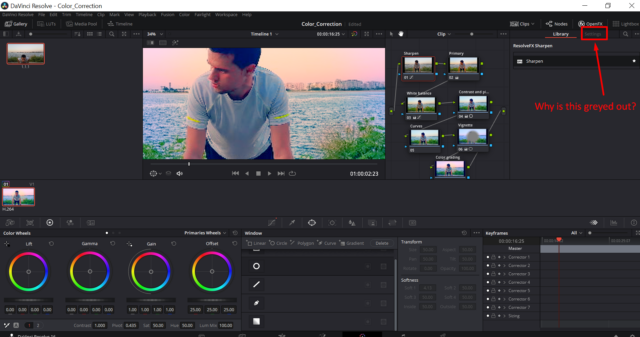
    When I go to the Fusion tab -> Open FX -> select Resolve FX Sharpen, I see the Settings button is greyed out.

    Do you know how I can unlock that? I need it so that I can adjust the sharpening.

    Thank you!

    Michael Gissing replied 5 years, 7 months ago 2 Members · 1 Reply
  • 1 Reply
  • Michael Gissing

    September 29, 2020 at 6:10 am

    In the grade page (which is what your image shows, not fusion), you drag your OFX plugin to a node. Then the controls should be available. Be aware that only the studio version of Resolve includes access to all OFX plugins. If you have the free version, you might not be able to use that sharpen plugin. However you can use the built in sharpen/ blur options. The icon next to the tracker opens up the blur/mist/sharpen tool

We use anonymous cookies to give you the best experience we can.
Our Privacy policy | GDPR Policy