-
Setting up triplanar node based material
I’m trying to setup more complicated triplanar texture for cube objects in my project.
My goal is to have controllable gradients on separate cube planes.
I’m having trouble projecting repeating gradient on specific plane (+x,+y,+z)
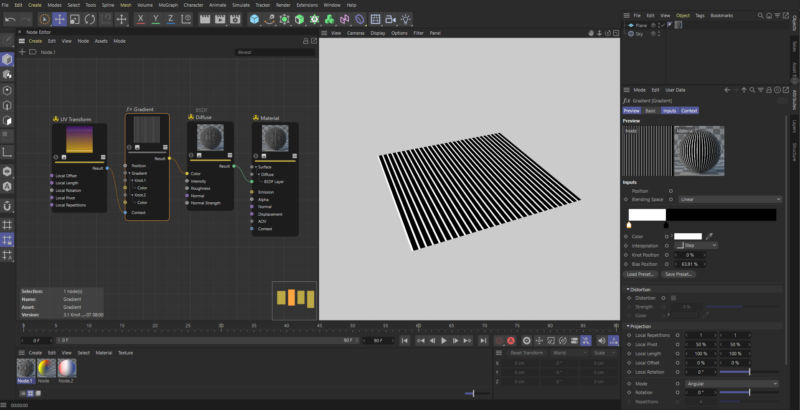
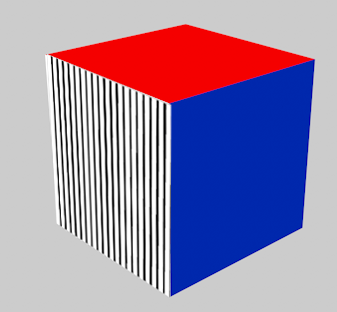
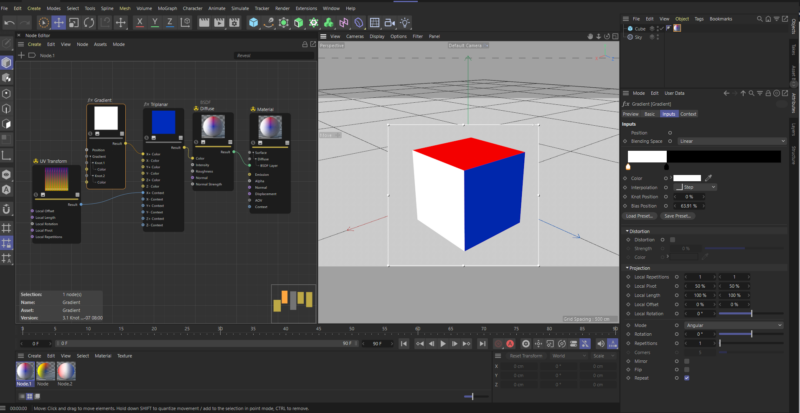
I’ve managed to get the effect I need on a simple plane using gradient and UV Transform nodes (Picture 1), but when I try to do it with triplane node it’s not working as I’d like it to. (Picture 2 – cube with white +X plane)
First image is the effect I’m aiming for, repeating the simple black and white gradient on a specific plane, and the second image is me trying to set it up using triplanar node in C4D.
I’ve realized my problem is in scale, so if the first color in gradient node is i.e. red, cube plane +x would be completely red, but other part of the gradient would not show no matter what settings I use in UV transform node.
Also, I’ve tried plugging the UV transform node directly into the gradient node as result, but still, output is the same.
Picture 3 (cube with striped lines) is what I’d like to get.
Any help is much appreciated.