Creative Communities of the World Forums

The peer to peer support community for media production professionals.

Activity Forums Adobe Photoshop Selection border issue

  • Selection border issue

    Posted by Karl Lohninger on September 4, 2024 at 4:09 am

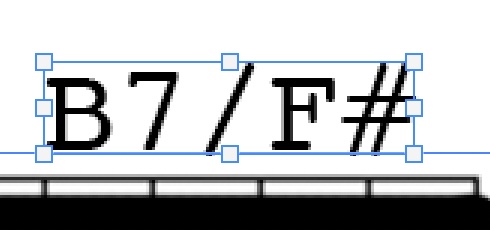
    Whenever I select a layer it gets surrounded by a square with handles on all sides. Especially when the layer in question is very small the handles cover up the actual layer m making kit very difficult to move precisely. The attached photo is highly enlarged.

    Question : is there a way to get rid of these ‘surroundings’ when selecting a layer?

    Hector Vera replied 1 year, 8 months ago 2 Members · 3 Replies
  • 3 Replies
  • Hector Vera

    September 4, 2024 at 4:25 pm

    Does the borders still show up when you are clicking another layer in photoshop? Usually in my case, this border mainly comes out when you press the CTRL+T command but usually clicking another layer would deselect it and the selective border issue disappears. Also did you tried simply clicking on the layer at the location where it is before it has the selection border as soon as you first open the project file? If you simply click it, you can move it around without the borders there. And yeah scaling/enlarging it can be easier to move around with the borders. If you have to shrink the layer, I recommend you zoom in just as much so you can more easily move the layer around to get passed around the borders blocking your view. Hope it helps and that I hear back from you soon! 🙂 Good luck!

  • Karl Lohninger

    September 5, 2024 at 12:17 am

    Hi, thank you. Yes the borders ’disappear’ when I select another layer but to move/nudge the layer I have to select it again. And here’s that pesky border again!

  • Karl Lohninger

    September 5, 2024 at 8:40 am

    It was Reddit to the rescue: “With the move tool selected, there should be a checkbox in the top bar that says show transform options. Uncheck it. “

    And that was the solution 😉

  • Hector Vera

    September 5, 2024 at 4:41 pm

    Sweet! Glad you were able to figure out afterwards! Yeah you can check and uncheck layers too if you choose to have them visible or not.

We use anonymous cookies to give you the best experience we can.
Our Privacy policy | GDPR Policy