

Activity › Forums › Adobe After Effects › Second SSD for cache?
-
Second SSD for cache?
Posted by Adam Faro on August 14, 2025 at 11:20 pmHi, should I buy a second drive for the AE and AME cache? I currently have a 2TB Samsung 990 Pro in my laptop, and the second slot is empty. I work in AE daily with fairly simple projects, 4K videos with simple text and logo animation, and some watermarking. I make quite a lot of these videos.
Paul Minnaar replied 1 year, 1 month ago 4 Members · 3 Replies -
3 Replies
-

Ivan Eldredge
August 15, 2025 at 2:42 amHi there!
If you’re working in After Effects daily and churning out a high volume of 4K videos, adding a second drive specifically for your disk cache (and optionally for AME temp files) can be a good idea. Your current drive is fast, but splitting the load between two drives and having one just for apps and the operative system and the other one just for video tasks (Media and projects used by After Effects, Premiere Pro, AME, etc.) is always recommended on any dedicated video workstation.
Even with “simple” projects, caching 4K comps adds up fast. A dedicated cache drive keeps your system drive lean and helps AE/AME run more smoothly. Just make sure the second SSD is also NVMe to match the speed. A 1TB drive would be more than enough for cache unless you’re dealing with massive comps.
So: not mandatory, but highly recommended. It’ll give you faster previews, less system strain, and a more responsive overall workflow.
Good luck with your projects!
Best,Ivan Eldredge G.
-

John Martin
August 15, 2025 at 11:09 amyo Adam, if you already have a fast ssd like a firecuda, it won’t really make a big difference to segment the work on a dedicated drive, if you really want to speed things up, maximize the speed of your RAM, go with crazy speeds like 7000mhz ram sticks and a lot of it, maybe 64 and up. That’s the best investment you can make, then cpu, then gpu, then ssds, good luck and send me a message in the inbox in case you need more detailed help!
-

Paul Minnaar
August 15, 2025 at 11:26 amHi there.
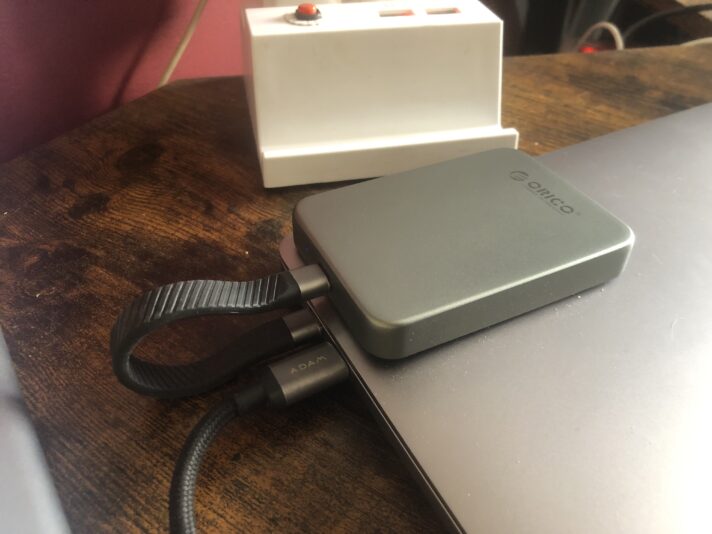
A second dedicated ssd for AE is a must. I use a Orico 1TB which sticks to the back of my monitor – see pic, it works beautifully.
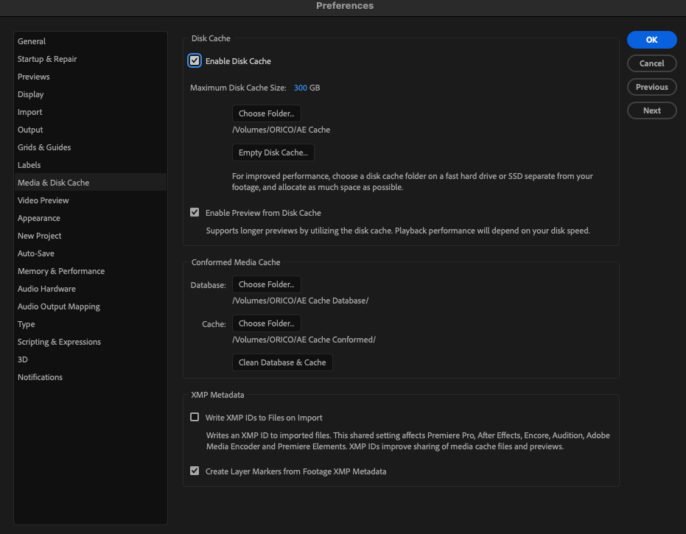
In AE, set the cache very high, change the folder to one on the new SSD.
Also, create 2 others for Database Cache and one for Conformed Cache, also on the SSD.You will see performance improvements.

Reply to this Discussion! Login or Sign Up