Creative Communities of the World Forums

The peer to peer support community for media production professionals.

Activity Forums Panasonic Cameras SDHC Card Issue

  • SDHC Card Issue

    Posted by Marcelino Guel on June 7, 2009 at 5:39 am

    I have some pretty important footage that I need to get off of an SDHC card. I was having issues with FCP’s Log & Transfer not picking up the SDHC card Volume, so I ejected it, waited for the light on the reader to go off, and then I removed it.

    Now, when I plug in the card with the reader I get the following error:

    I can see my files, but I cannot use Log & Transfer. Also, when I place the card in the camera and try to view the clips, it tells me there is a “System Error, Turn off Camera”.

    I tried another card in the camera and it works just fine.

    I’ve also tried copying the files to my desktop, but when I try to import with FCP I get this error:
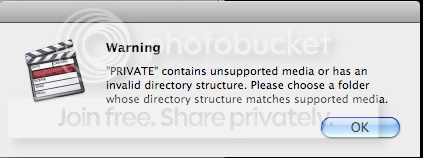
    Photobucket

    I’ve had the same experience on two different Mac’s.

    I am open to any suggestions at this point. Please help if you can….

    Duffer Schultz replied 16 years, 11 months ago 3 Members · 4 Replies
  • 4 Replies
  • Marcelino Guel

    June 7, 2009 at 5:53 am

    Ok, so I’m not as freaked out as I was a moment ago…

    The beauty is, I have the .MTS files and I just did a quick conversion using Handbrake.

    This means that my videos are still there, but I need an application that will keep the conversion quality (720 60P) just as good as FCP.

    Any suggestions?

  • Duffer Schultz

    June 10, 2009 at 9:04 am

    I think Toast version 9 and later will convert your files

  • Bradley Morales

    June 17, 2009 at 2:39 am

    I also have the camera, read the sdhc on the macbook pro – .mts files. I’m shooting yet won’t get FCP for several months, but want to back up these files to external drive. Is it best to drag these .mts files there as a backup or wait until I have converted them in FCP and then save them?

  • Duffer Schultz

    June 17, 2009 at 2:50 am

    You can copy the contents of the card to a backup drive — just make sure to copy the entire file structure, Private folder and all. I create a folder for the client/project/date and card #, and then put the Private folder and subfolders in that.

    Otherwise you’ll have issues using FCP log and transfer

We use anonymous cookies to give you the best experience we can.
Our Privacy policy | GDPR Policy