Creative Communities of the World Forums

The peer to peer support community for media production professionals.

Activity › Forums › Adobe After Effects Expressions › Scaling according to Position

  • Scaling according to Position

    Posted by Sam Isfat on October 18, 2020 at 4:05 pm

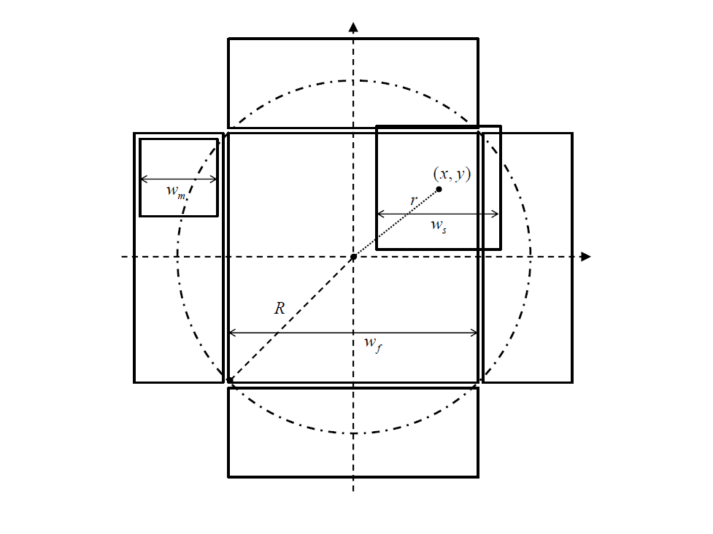
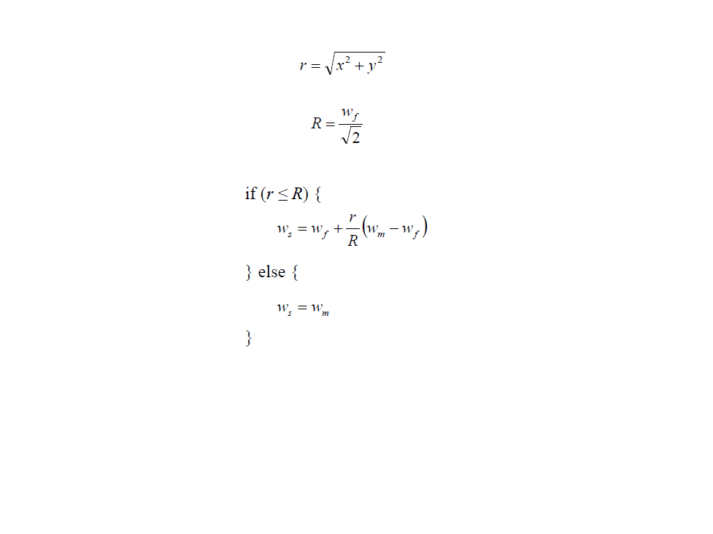
    In the beginning, the image will be in the center box and its size will be Wf and I can drag it to left/right/up/down. Its size will change according to the logic of the image I attached. As this scaling will depend on the position I can’t figure out how to do it. How can I achieve my desired result?

    Sam Isfat replied 5 years, 11 months ago 2 Members · 5 Replies
  • 5 Replies
  • Dan Ebberts

    October 18, 2020 at 4:56 pm

    I’m not sure it’s exactly right, but probably something like this:

    wm = 50;

    wf = 150;

    R = wf/Math.SQRT2;

    center = [thisComp.width,thisComp.height]/2;

    r = length(position,center)

    ws = linear(r,0,R,wf,wm);

    [ws,ws]

  • Sam Isfat

    October 19, 2020 at 6:22 am

    Thanks, it’s almost working but what if I don’t want the center value as the center of the composition. I want it something like [200,300] as I declare. Do you have any idea how to do that?

  • Sam Isfat

    October 19, 2020 at 6:26 am

    I tried it like “center = [100,300];” this. But then the whole code is not working.

  • Dan Ebberts

    October 19, 2020 at 7:04 am

    That works for me. In what way is it not working for you?

  • Sam Isfat

    October 19, 2020 at 11:30 am

    yeah,it worked..thank you so much
    This is how achived it:

    wm = 100;

    wf = 496;

    R = wf/Math.SQRT2;

    center = [540.7397,627];

    r = length(position,center);

    wa=wf+((r/R)*(wm-wf));

    ws = linear(r,0,R,wa,wm);

    [ws,ws]

We use anonymous cookies to give you the best experience we can.
Our Privacy policy | GDPR Policy