-
Rotation and trigger expression rig
Hi, I’ve uploaded a project to help. I’m trying to build a rig. Basically I have 24 pre-comped layers in a circular pattern parented to a null so I can rotate as a whole. They need to stay up right. I have that expression part done.
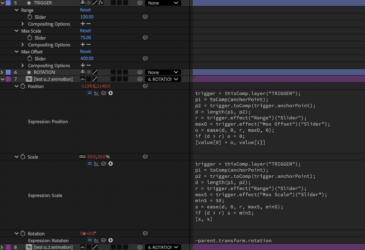
As the layer enters the tigger box (range) I need that one layer in the box to scale up slightly to 75 and move in the positive x position slightly. Adjustable by slider in a controller null. I have the scale expression working. Id also like to trigger a prebuilt animation within the preComp.
My issue currently is the position translation in the x axis. The expression works sort of until I rotate 180 degrees these layers move in the opposite direction and in the Y axis which I don’t want.
I have not started on how I would go about triggering the prebuilt animation in the pre-comp.
any tips would be much appreciated.
Scale expression:
trigger = thisComp.layer(“TRIGGER”);
p1 = toComp(anchorPoint);
p2 = trigger.toComp(trigger.anchorPoint);
d = length(p1, p2);
r = trigger.effect(“Range”)(“Slider”);
maxS = trigger.effect(“Max Scale”)(“Slider”);
minS = 50;
s = ease(d, 0, r, maxS, minS);
if (d > r) s = minS;
[s, s]
Position expression:
trigger = thisComp.layer(“TRIGGER”);
p1 = toComp(anchorPoint);
p2 = trigger.toComp(trigger.anchorPoint);
d = length(p1, p2);
r = trigger.effect(“Range”)(“Slider”);
maxO = trigger.effect(“Max Offset”)(“Slider”);
o = ease(d, 0, r, maxO, 0);
if (d > r) o = 0;
[value[0] + o, value[1]]