Creative Communities of the World Forums

The peer to peer support community for media production professionals.

Activity Forums DaVinci Resolve Resolve Software 20.2

  • Resolve Software 20.2

    Posted by Eric Quao on September 21, 2025 at 9:35 pm

    Hello,

    I wanted to try and find a solution to this problem…

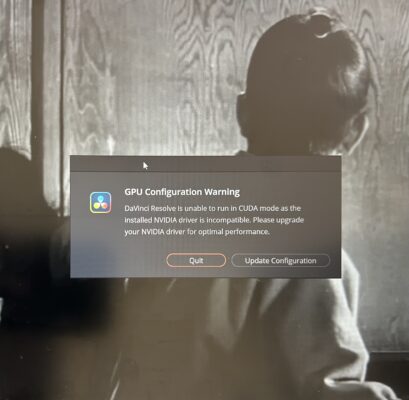
    I recently added resolve 20.2 to my laptop and right now it is not operating correctly cause I kept getting this pop up (refer to attached pic). Can anyone help me understand what it means cause I’ve never dealt with this issue before. The specs for the laptop are below. Thanks


    Intel Core i9-14900HX Processor

    32GB DDR5 5600MHz Memory

    2TB M.2 NVMe PCIe

    Gen 4 SSD solid state drive internal storage.

    Eric Quao replied 7 months, 2 weeks ago 3 Members · 5 Replies
  • 5 Replies
  • Mads Nybo jørgensen

    September 21, 2025 at 9:57 pm

    Hey Eric,

    Not sure what make and model of PC hardware that you are using, so may be different on your system:

    Davinci clearly thinks that there is a NVidia chip (or card?) installed on your system.

    There has recently been issues between Windows (11 in my case) and NVidia, and Adobe and NVidia + everything else.

    Either search for NVidia in search panel to see if NVidia software (app) appears. There you can check for the latest version of NVidia software.

    If not, Right click on Windows icon at the bottom and open “Device Manage”.
    NVidia shoud show under “Display Adapters”.

    Hope that this helps?

    Atb
    Mads

  • Eric Quao

    September 21, 2025 at 10:31 pm

    Mads,

    Thanks for getting back to me. I do have windows 11 too but I will definitely look into what you advised and get back to you.

    thanks

  • Michael Gissing

    September 22, 2025 at 5:42 am

    You should go to NVIDIA’s website and download and install the latest Studio driver. Avoid the game drivers. I was advised by Blackmagic many years ago to do a custom install so you can check to uninstall the old driver as it installs the new one.

  • Michael Gissing

    September 24, 2025 at 2:16 am

    I also spotted a YouTube clip on this issue and the fix was to have drivers updated and if that didn’t fix it, then change the preference settings – GPU configuration from auto to OpenCL

  • Eric Quao

    September 27, 2025 at 1:15 am

    Micheal and Mads,

    Thank you for the help and definitely for the youtube information.

    God bless

We use anonymous cookies to give you the best experience we can.
Our Privacy policy | GDPR Policy