Creative Communities of the World Forums

The peer to peer support community for media production professionals.

Activity Forums Adobe After Effects Resampling image source (size) within after effects

  • Resampling image source (size) within after effects

    Posted by Jesse Bowen-saunders on January 28, 2021 at 6:30 am

    Hi there!
    I have this little workflow irk which involves having to resize massive images in photoshop after draggin them into my composition and realising that After Effects (or especially media encoder) can’t handle them.

    Many people supply me with absolutely massive images and I don’t want to always have to check or resize it it’s too big. Sometimes it’ll even seem fine, but then when I get to exporting it’s crashes galore!

    So is there a way to resample the image source within after effects without having to take it into photoshop? I thought of maybe resizing it into a small precomp but I am not sure whether that will have the same effect on the processing time. (If it does and that’s the solution please let me know! Otherwise I just might go crazy).

    Okay thank you!!!

    Jesse Bowen-saunders replied 5 years, 3 months ago 5 Members · 7 Replies
  • 7 Replies
  • Filip Vandueren

    January 28, 2021 at 9:05 am

    Right click on the footage and select “create Proxy -> Still”

    Then, in the render setting set it to half resolution.

    Don’t forget to render the final output with proxies enabled.

  • Daniel Griffin

    January 28, 2021 at 1:02 pm

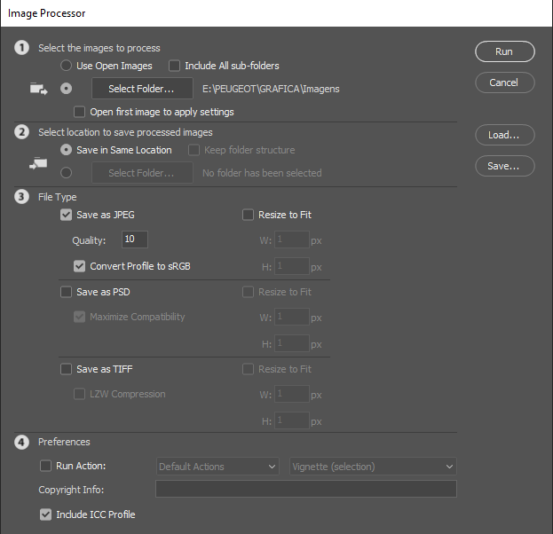
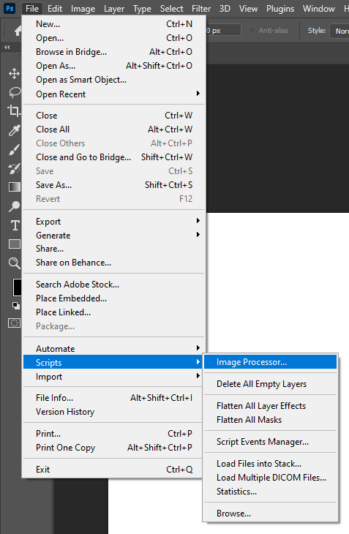
    I would suggest you to use Image Processor script in Photoshop. To resize all your images before using them in After Effects. This script can resize a bunch of images very fast and easy.

  • Kevin Camp

    January 28, 2021 at 4:14 pm

    Filip’s method is a great way to do it within AE, but if you are doing this often I think Daniel’s method is probably less work in the long run. You can also create droplet that in Photoshop that can run the resizing action, then you just drop the images onto an icon on your desktop and Photoshop will resize them.

    This page describes how to create the droplet:

    http://uozdesign.com/make-your-first-photoshop-resize-droplet

  • Kevin Reiner

    January 28, 2021 at 5:15 pm

    To go even further, you could use Automator plus a Photoshop script to make an application or service. For Mac of course, but there is probably a way to make a watch folder somehow on PCs too. Here’s kind of what I’m talking about: https://www.howtogeek.com/363868/how-to-batch-resize-images-with-automator-on-mac/

  • Jesse Bowen-saunders

    January 30, 2021 at 8:39 am

    A great solution Kevin! Thank you for delving deep into the quick and easy, just the sort of thing I was after. I’ll give it a go!

  • Jesse Bowen-saunders

    January 30, 2021 at 8:40 am

    Thank you Daniel! Hadn’t any idea about that script, that should be quite handy 🙂

  • Jesse Bowen-saunders

    January 30, 2021 at 8:41 am

    Cheers Filip! That is a good way to do it within after effects, could be useful if I’m feeling lazy 😛

We use anonymous cookies to give you the best experience we can.
Our Privacy policy | GDPR Policy