Creative Communities of the World Forums

The peer to peer support community for media production professionals.

Activity Forums DaVinci Resolve Replace audio source clip? Bug?

  • Replace audio source clip? Bug?

    Posted by Tim Neighbors on October 22, 2025 at 12:26 am

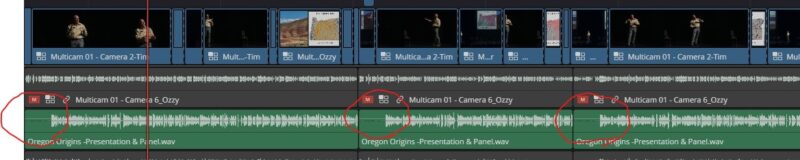
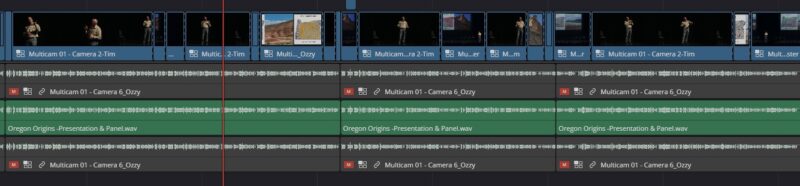
    This should be simple, or I may have found a bug. I received a new version of an hour-long audio file from a mixing engineer and want to swap it out for the previous version that I have been using in my davinci edit. There are many edit that have been done to that audio file on the timeline, so I want to swap out the source and keep all of my edits intact. On the edit workspace, when I right click the file in the media bin and select ‘clip operations/replace selected clip’, then select my new version, the audio starts over at each cut point on the timeline. For clarity, the person speaking in the video starts saying “Hi welcome to the show…”, then 4 minutes later there’s another cut and the audio repeats “Hi welcome to the show…”, etc. …and naturally it’s all out of sync. I’ve attached photos so you can see the before and after replacement. You can see by the waveforms that the audio is looping at each edit. I can’t imagine someone wanting this behavior, so I wonder if this is a bug. But this should be a pretty common thing to have to do and I’m still relatively new to this software, so maybe this isn’t the correct way to do this?

    Raymond Lutz replied 7 months, 1 week ago 3 Members · 4 Replies
  • 4 Replies
  • Michael Gissing

    October 22, 2025 at 12:52 am

    The audio file probably has no timecode so the replacement doesn’t have a reference. The way I replace a file and retain the edits is to relink the file to the new one. I hope you have a backup or duplicated the timeline before you did the replace.

  • Tim Neighbors

    October 22, 2025 at 1:11 am

    But how do you do that? Just change the file name on the hard drive to the same name as the old one and remove the old one and relaunch the project? That’s how I did it last time, it’s just a shame to do it that way cause it could create confusion if the mixing engineer asks for the filename of the file I’m using. Not to complain, but other software doesn’t seem to have this issue. I wonder if Blackmagic just needs to figure something out about audio handling.

  • Tim Neighbors

    October 22, 2025 at 1:12 am

    BTW, I’m working with Version 20.2.2 build 10.

  • Raymond Lutz

    November 1, 2025 at 10:27 pm

    “Refresh” clips when external media changes is a constant contentious point for Davinci Resolve… see https://forum.blackmagicdesign.com/viewtopic.php?f=33&t=132370 .

    1- Resolve doesn’t automatically refresh clips that changed on the filesystem (even though any modern OS has low CPU usage APIs for subscribing to file changes)

    2- The “changing clip name” work around doesn’t work if the new name has been used in the past and still in Resolve cache… so in my script to make MediaPoolItem:ReplaceClip() work, each of my new clip version has a changing incremental version suffix:

    DSC_8064vA.MOV

    DSC_8064vB.MOV

    DSC_8064vC.MOV etc…


We use anonymous cookies to give you the best experience we can.
Our Privacy policy | GDPR Policy