Creative Communities of the World Forums

The peer to peer support community for media production professionals.

Activity Forums DaVinci Resolve Rendering

  • Rendering

    Posted by Ashley Cumla on June 20, 2022 at 12:28 pm

    hello, i have a problem.


    I edited a 3 minute video (its a slideshow so theres some transitions) in my Davinci Resolve 17. When rendering, it keeps on crashing and it closes automatically.


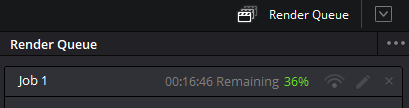
    I searched some ways on how to fix it, i changed the settings, the “compound clip,” and i also updated my nvidia drivers. And now im rendering it after doing all of that, it stopped here at 36%. Its not moving since then and i hate to admit it but this is like my 100th render and the 99 of those only reach at 10% or something.


    Please help me asap, can I still continue this 36% rendered in my video? if theres a way on how to do that, please let me know. its kinda slow to wait for the red line to disappear and i do not want to wait again when i know its gonna crash again. im new to davinci and i studied it for the whole week just so i can edit this video, its that important, its for fathers day 🙂 my laptop is an asus windows 10 64 bit btw!

    Thank you.

    David Baud replied 4 years, 2 months ago 3 Members · 2 Replies
  • 2 Replies
  • Eric Santiago

    June 21, 2022 at 3:52 pm

    Have you checked at which point it crashes? If it’s the same spot check the media and see if that’s causing it.

    You can also duplicate the timeline and cut it into segments to see which is a pain to render.

    The other archaic way is to render a DPX and re-import to add to a container.

    But if its crashing with that then you def have a source issue.

  • David Baud

    June 21, 2022 at 6:01 pm

    Hard to tell from here without much info about:

    . media format

    . timeline settings including frame size, frame rate etc…

    . render format output

    . internal and/or external hard drive? sizes?

    . GPU VRAM size

    . CPU RAM size

    So many things can go wrong…

We use anonymous cookies to give you the best experience we can.
Our Privacy policy | GDPR Policy