Creative Communities of the World Forums

The peer to peer support community for media production professionals.

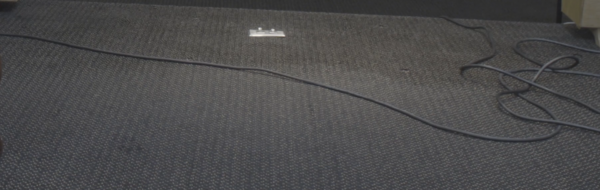
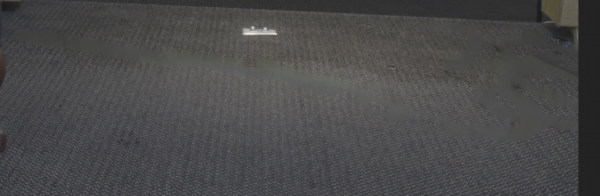
Activity Forums Adobe After Effects Removing Black Wire From Carpet, Content-Aware Fill Isn’t Working

  • John Fishback

    September 17, 2021 at 3:44 pm

    Try applying it to smaller segments. There’s a large variation of the background across the entire image. Content Aware Fill may be averaging the fill in some way.

  • Jonathan Reed

    September 18, 2021 at 5:02 pm

    It’s still the same fuzz. What confuses me is I’ve seen this work on youtube tutorials where people are removed so the intricate breaking of an ocean tide can be shown. So why can’t this program do this carpet. Then again, I could be missing something.

  • Daniel Griffin

    September 18, 2021 at 8:09 pm

    Have you tried using Mocha? https://www.youtube.com/watch?v=mEgmBFLTumQ

    Some contents or functionalities here are not available due to your cookie preferences!

    This happens because the functionality/content marked as “Google Youtube” uses cookies that you choosed to keep disabled. In order to view this content or use this functionality, please enable cookies: click here to open your cookie preferences.

  • Michael Szalapski

    September 19, 2021 at 5:51 pm

    What are your content aware fill settings? I’d think you’d want surface mode instead of object. Also, have you tried creating a reference frame in Photoshop?

  • Jonathan Reed

    September 20, 2021 at 7:56 pm

    I’m not able to afford Mocha but it looks awesome!

  • Jonathan Reed

    September 20, 2021 at 7:59 pm

    Alpha Expansion is 0

    Fill Method Is Surface

    Lighting Correction is off

    Range is Work Area.

    Cloak Version 3.1.0

    Output Location

    Path Type Project Relative

    Path ./Fils

    Create Photoshop Reference Frame is clicked.

    I hope this answers your question.

    I don’t have a lot of experience with Photoshop. Sorry.

    JR

  • Ross Shain

    September 24, 2021 at 6:24 pm

    FWIW, you can get a monthly subscription to Mocha Pro for Adobe for only $37 if you want to try it out.

    https://borisfx.com/store/?collection=mocha-pro&product=mocha-pro&host=plug-in-adobe

  • Michael Szalapski

    September 24, 2021 at 7:28 pm

    Did you make a good reference frame in Photoshop?

We use anonymous cookies to give you the best experience we can.
Our Privacy policy | GDPR Policy