

Activity › Forums › Maxon Cinema 4D › remove JOINTS and record the animation of the VERTICES ?
-
remove JOINTS and record the animation of the VERTICES ?
Posted by Mauricio Barrientos on September 5, 2024 at 2:05 pmI am developing an animation for Apple Vision Pro, and it DOES NOT ACCEPT ANIMATED JOINTS, it only accepts basic polygon and vertex animations. I’ve already baked the animation in the timeline, but it’s still not accepted because it was made using JOINTS (bones). I animated a MESH with joints and baked the animation, but it’s still not accepted or reflected in Vision Pro. My specific question is: how can I RECORD the movement of the points (vertices) of the mesh or polygons and then BAKE the animation? In other words, I want to use JOINTS to deform the MESH and then save and record the movement of the vertices and polygons, ELIMINATING THE JOINTS, but keeping the animation without the JOINTS. Is this possible?
https://drive.google.com/file/d/16_CstbIwqRF-HMbeTC-L1_ZdjpzKV25p/view?usp=sharing
 Kouraib Abdmalek replied 2 years ago 2 Members · 11 Replies
 -
11 Replies
-

Kouraib Abdmalek
September 6, 2024 at 10:04 amHi Mauricio,
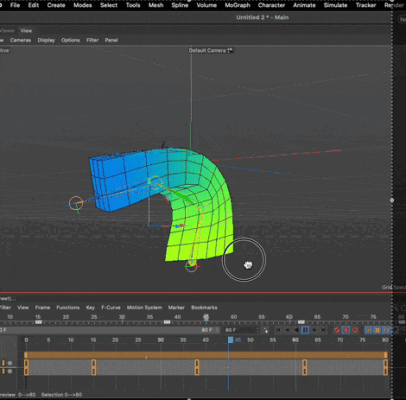
I mentioned in a previous post with you that Unity reads Skin deformer with a bone structure, you could bake the animation and convert it to Unity and then Apple Vision, maybe that makes it read the animation, I tried several ways to transform the movements of the joints to the mesh but nothing worked for me except using the Retarget tag as in the screen recording below, but I don’t think that will lead us to move all the points of a certain model according to the movements of the joints. I hope this is useful to you and let me know please if you come up with something.
-

Mauricio Barrientos
September 6, 2024 at 1:24 pmGRATEFUL for the response, seriously… the technique is obscenely beautiful and excellent, but it’s not what I’m looking for, because what I’m looking for is to deform the mesh and record the deformation without the bones_joints in the end.
-
Mauricio Barrientos
September 6, 2024 at 9:06 pmi find this video ……
but not work yet
Some contents or functionalities here are not available due to your cookie preferences!This happens because the functionality/content marked as “Google Youtube” uses cookies that you choosed to keep disabled. In order to view this content or use this functionality, please enable cookies: click here to open your cookie preferences.
-
Kouraib Abdmalek
September 7, 2024 at 10:18 amAlways happy to help you, Mauricio! I understood you very well from the beginning your presentation of the problem was clear, I don’t have much knowledge about Unity but I assumed that since it reads the Skin deformer with the bone structure it might be converting the movement information to the mesh so that if we convert the same file again from Unity to Apple Vision it can read the movement, that’s the idea, the video you shared with me might be misleading and its owner didn’t explain the method so I don’t advise you to waste a lot of time trying to simulate it especially since Unity experts say that so far there is no way to convert the deformation from cinema 4d except through Skin deformer, please let me know if you have tried converting to Apple through Unity and what results or obstacles you might have encountered.
-
Mauricio Barrientos
September 8, 2024 at 3:18 pmBrother, seriously… extremely grateful… your help is very valuable to me and this forum, seriously… thanks. Look, what I’ve achieved so far is that I send the mesh with the bones [joints] to UNITY, and within Unity, I do the animation [as if it were Cinema4D]… it’s three times as tedious, [seriously, it’s annoying to work like that], but it works, about 70% of what I’m looking for, so for now, I’ll do it this way… and I discovered this just when I sent you the video 2-3 days ago… so for now, that’s how it will be… adding that the joints don’t respond as one would like or as they would in Cinema… I repeat, Cinema and Unity can indeed make VERY PERFECT animations, my problem is exporting it to APPLE VISION PRO, which doesn’t understand the Unity animations, hence, those made in Cinema FBX… clarifying!!!!!
-
Kouraib Abdmalek
September 9, 2024 at 8:53 amThanks for your appreciation! honestly I don’t have an explanation for this, this may require an Apple expert to explain it, but it is known that Apple is picky and they are selective in what works on their devices. Exporting the usdz file from the cinema 4d may not work and it is better to export to Obj and then pass it through the Reality Converter pro (which is completely free) to get the usdz file, but even with this, it seems that there are limited areas, an other thing it’s also seems that Blender is more fortunate in working with Apple vision, it may be used as a mediator between the cinema 4d and the VisionOs.
I hope this is useful to you.
-
Mauricio Barrientos
September 9, 2024 at 12:55 pmthats corrct … i will try blender as a bridge
–
bless
-
Kouraib Abdmalek
September 9, 2024 at 1:05 pmGood luck! let us know (when you have time) what you got.
-
Mauricio Barrientos
September 9, 2024 at 3:02 pmHello brother, greetings once again, endlessly grateful… I downloaded 3 different versions of BLENDER for Mac Ventura ARM chip M1, and none of them managed to recognize the imported FBX… I’ve been disappointed with Blender for more than a year now for these same reasons, it’s very picky from Unity’s perspective, and Cinema 4D is the best. However, here I leave you a video with a sped-up camera 2X to show you that I exported a cube and a donut… and the cube with joint animations in one of the latest Cinema R24 versions, but Blender didn’t understand it… I’ll keep trying and let you know to help others with this issue… blessings once again..
.
Some contents or functionalities here are not available due to your cookie preferences!This happens because the functionality/content marked as “Google Youtube” uses cookies that you choosed to keep disabled. In order to view this content or use this functionality, please enable cookies: click here to open your cookie preferences.
-
Mauricio Barrientos
September 9, 2024 at 4:19 pmOkay brother, 2 hours later… I’ve learned to make animations with joints_bones in BLENDER and export them directly to Unity… and although the animation ALWAYS, I repeat, ALWAYS works inside Unity… when exporting it to XCODE and compiling it for VISION PRO, it stops working… Here’s a video with a quick camera from Unity to Xcode and to Vision Pro… where the animation of the BLUE DONUT works inside Unity but doesn’t work on VISION PRO… and the bears in the background that do move, it’s because I animated the joints_bones INSIDE UNITY… Thanks again and a big hug… we tried, LOLOLOL.-!
–
Some contents or functionalities here are not available due to your cookie preferences!This happens because the functionality/content marked as “Google Youtube” uses cookies that you choosed to keep disabled. In order to view this content or use this functionality, please enable cookies: click here to open your cookie preferences.
Reply to this Discussion! Login or Sign Up