

Activity › Forums › Apple Final Cut Pro › Remove Background
Tagged: Basic
-
Remove Background
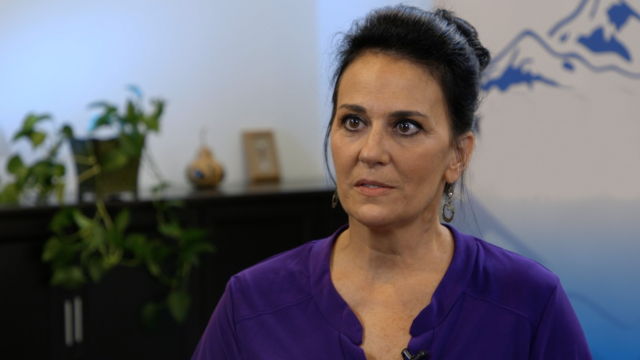
Posted by Thomas Mazzarella on December 8, 2020 at 6:14 pmDoes anyone out there know how I can remove a background or portion of a background from an interview video shot? Can someone please tell me what plugins work best for that and maybe some guidance? Attached is the frame from the video. Thanks so much!
David Battistella replied 5 years, 9 months ago 4 Members · 7 Replies -
7 Replies

-

Chris Northcross
December 8, 2020 at 6:50 pmRotoscoping is the general answer here. What all are you looking to remove?
Depending on what all needs to be removed, you likely will want to use a tool package that is specifically geared towards roto work like After Effects (which has a tool called Roto Brush), Mocha, or Silhouette FX or farm the shot/shots out to a roto artist.
In the event that you’re thinking about doing the roto work yourself, be advised that it can be a very time-consuming, painstaking affair. It’s not a fast process even with some of the automated tools.
-

Thomas Mazzarella
December 8, 2020 at 7:17 pmThanks for your answer, I wanted to take out the numbers over the right side of the left shoulder.
-
Chris Northcross
December 8, 2020 at 9:15 pmThat’s a little bit more involved. You’d be doing a few things. First off you’d still need to roto that area so that be able to remove the background. That would effectively create a “hole” where the background was.
Then you’d need to create a “clean plate” that you’d use to cover the hole. The clean plate would need to be tracked somehow so that it would stay attached over the hole in the background if and when the camera moves.
Then you’d probably need to do some compositing to make the clean plate blend into the background. If any objects pass in front of that area while your clean plate area is onscreen (i.e. the woman in the purple shirt moves by it) you’d need to roto those objects as well.
Usually, if you want to remove something from a background, your best bet is to use a blue or green screen and then chroma key out the colors.. Removing backgrounds via chroma keying is generally much, much, much easier than trying to rotoscope something out once it’s shot.
-

Patrick Donegan
December 8, 2020 at 10:58 pmThere are many tutorials out there with “green screen technique”
so this is not a good place for a full tutorial.
If you want to know about a user’s specific technique, please give him
a clue as what you already know, like are you using one single light on your green screen? Or do you have a hand full of lights that light up your green screen from which directions?
-

David Battistella
December 10, 2020 at 6:38 pmI think Davinci resolve is your friend on this one. You could put a power window on that area and track it and use patch replacer from open FX, blur and grading tools . If the subject or shot don’t move much you could easily have it solved. If the interview lasts one hour, that is another story.
-
David Battistella
December 10, 2020 at 6:43 pmOr create a file like this to use as a cleanplate and use a node in resolve to do the replace.

Reply to this Discussion! Login or Sign Up