

-
Relinking media – when files won’t relink
There can be various reasons, but my common reason is ingesting footage in the field on my laptop, adding a LUT in the Event Browser for all clips, but back in the office, if I open the FCP Library on our main video editing computer, and if I had applied a different LUT that is not on that system or have given the LUT a different name, no matter what I do it doesn’t seem to relink.
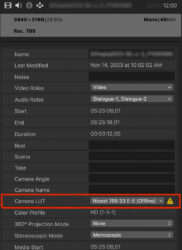
When actually, it has relinked the files, but the LUT is “offline” and the clips just look like they are not relinked. Once I select the clips, in the Inspector choose the “Info” tab and apply a LUT that is on the system, the clips slowly repopulate to show they are linked. However, one bug in FCP, sometimes I have to close FCP and reopen again for the change to appear.
Sorry, there were no replies found.