

Activity › Forums › Maxon Cinema 4D › Reflections still visible when animating visibility with display tag
-
Reflections still visible when animating visibility with display tag
Posted by Richard Frendt on August 8, 2021 at 2:28 pmI am using a display tag on an object to fade up its visibility with keyframes from 0 to 100%. The tag is working with the object itself, but the object has a material applied using reflections, and as soon as the visibility moves from zero to a small positive value, the object’s reflection becomes 100% visible (without the object). If I turn off reflections in the material, the object fades up as expected. What am I missing?
Thanks!
Jim Scott replied 5 years ago 2 Members · 8 Replies -
8 Replies
-

Jim Scott
August 8, 2021 at 4:15 pmI can’t reproduce the issue, at least as I understand it. Could you please post your project file?
-

Richard Frendt
August 9, 2021 at 11:29 amI’ve attached a simplified file demonstrating the issue with a simple sphere fading from 100% visibility to 0% over 90 frames. If the sphere’s material reflectance channel is switched off, the sphere disappears from view as intended (at frame 85 it is virtually invisible). With the reflectance channel on, though, a white reflection (of the sky object, I think) remains visible at the same intensity throughout the animation, and just the base color of the object fades. At frame 85, the sphere appears a fairly intense white.
Thanks for looking!
-
Jim Scott
August 9, 2021 at 3:19 pmThanks Richard. I misunderstood your first post, but I see what you’re talking about now. Nothing comes to mind immediately, but I will play with it and get back to you.
-
Jim Scott
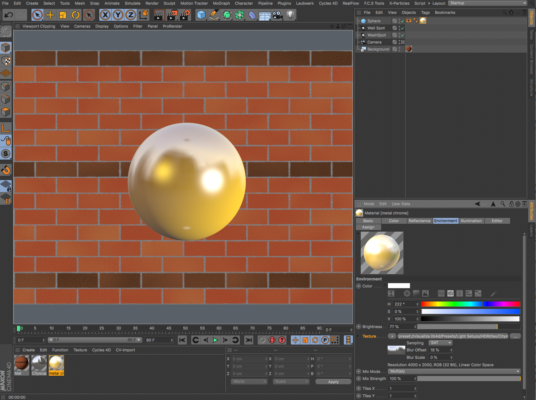
August 9, 2021 at 11:25 pmThis is a perplexing issue, and so far I have no clue as to why it is occurring. To get the display tag visibility fade to work properly either reflectance or the Sky object must be off. In order to get a similar look as your original one but without the Sky object, and keep reflectance for the two lights, I added an Environment channel to the sphere’s material and placed the .hdr file in there, added some Blur Offset, and set the Reflectance channel’s Attenuation to “Additive.” (I used a Brick texture in the Background material since I don’t have the one you used.)

-
Jim Scott
August 9, 2021 at 11:32 pmThe COW seems to be having issues with uploading an image. I’ll post the sample project file next.
-
Jim Scott
August 9, 2021 at 11:36 pmHere’s the modified project file (set the render to .mov and lowered the resolution just to make it faster to render).
-
Richard Frendt
August 10, 2021 at 11:46 amThanks for the workaround – I wasn’t able to download your file for some reason (“Anonymous caller does not have storage.objects.get access…”), but from your description I was able to modify my own file without the use of the sky object. If you ever hear why a sky object isn’t compatible with a reflecting object using visibility tag, let me know!!!
Appreciate your help!
-
Jim Scott
August 10, 2021 at 1:03 pmSorry you had issues with downloading. For some reason I couldn’t upload images yesterday, so perhaps the COW server was having problems. I will certainly pass it along if I come across an explanation or solution for the visibility tag issue.
Good luck with your project.
Edit: I just tried to download the project file and got the same error message you did. Something’s definitely amiss.
Reply to this Discussion! Login or Sign Up