Creative Communities of the World Forums

The peer to peer support community for media production professionals.

Activity Forums Adobe After Effects Recreating a brush stroke effect for character outlines

  • Recreating a brush stroke effect for character outlines

    Posted by Frank Anderson on June 14, 2023 at 11:26 pm

    I am aiming to recreate a very rough-looking animated outline procedurally / using effects for characters similar to this reference: https://tenor.com/view/mario-strikers-battle-league-mario-strikers-battle-league-football-mario-strikers-nintendo-mario-gif-25663004

    Even though the reference footage has 3D characters and effects, I’m hoping to recreate this in 2D. The character animations I’m making are made in Animate, outline and fill on their own separate layers, so when importing them into AE they become SWF files.

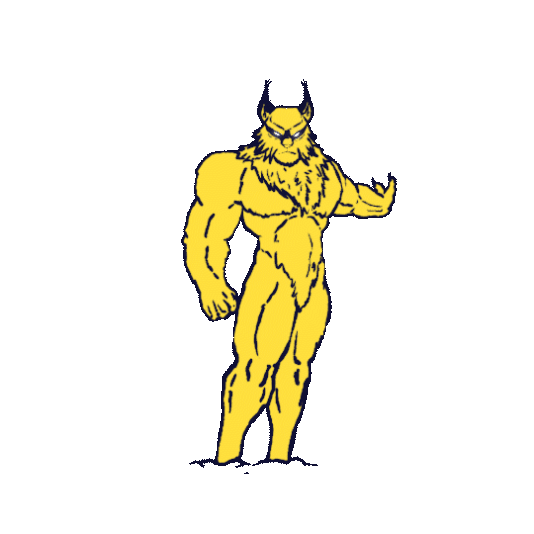
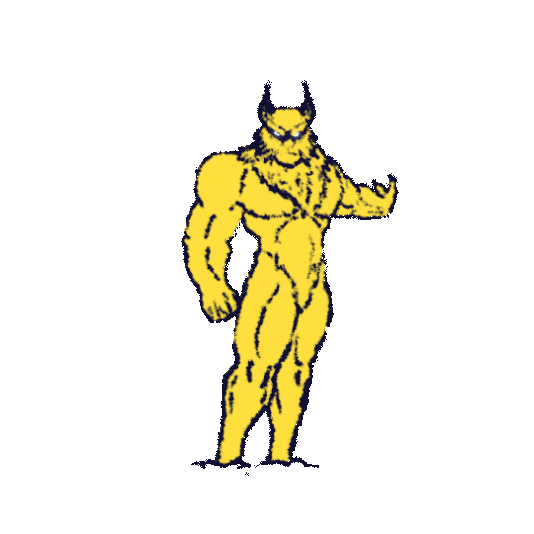
    So far I’ve used the roughen edges effect (first gif) and then I added on top the brush stroke (gif 2) effect to achieve the current result. However, I am not quite satisfied since the brush stroke effect only allows one stroke angle as I would prefer the angle to change depending on the direction of the outline. Is there also any way to limit the brush stroke effect to every 5 frames like I am able to with posterize time on the random seed property on the roughen edges effect?

    I would still want the outline to be as extreme as in the reference, but I doubt I can achieve it using these two effects.

    Would anyone here have any tips or ideas how to recreate the look as in the reference?

    Frank Anderson replied 3 years, 2 months ago 3 Members · 3 Replies
  • 3 Replies
  • Filip Vandueren

    June 15, 2023 at 9:34 am

    Hi Frank,

    I think you will have the most options if you convert the outline of the character to a shapelayer, then you can use multiple strokes (black and white) with modifiers such as Offset Paths and Wiggle Paths to get a jittery outline, and you still have the options to enhance that with roughen edges.

    To get more of an actual Photoshop-like Physical Media brush-stroke, is tougher. I don’t immediately know of a good way simple way to do that in After Effects.

    I’ve exaggerated the width of the outlines, I think it’s an important aspect of your reference Mario images

  • Anders Hattne

    June 16, 2023 at 2:17 pm

    That’s an interesting challenge…
    I’m thinking you might be able to use a particle system to emit from one of your layers with 0 speed. Particular would do that. Not sure about particle world 2.

    For me It would take a bit of experimentation to get there.
    Just in case, if you have an evolution parameter using the posterizeTime expression will give you that stop motion look.
    posterizeTime(4);
    time*270

    I did a quick test using fractal noise with Displacement Maps which could give you control over the angle but you’d have to make masks to create the right angle, which would be cumbersome.

    Then I thought, in this day of AI, maybe there is a tool you could use? Try with EBsynth, draw the first frame and see if it can do a style transfer?

  • Frank Anderson

    June 16, 2023 at 8:36 pm

    Hi Filip,

    I was actually hoping to convert the SWF layers into shape layers for exactly the reasons you listed, but SWF files can’t be converted into shape layers. Unless there is some third party plugin out there somewhere. And because our pipeline is set in stone, we will have to use the SWF files, so you can understand why this is quite the problem.

    I really appreciate the demo you’ve done, it looks just like the reference. In hindsight I should’ve probably used an example where the character is actually moving, because then it may become apparent how your method would be quite time-consuming to manually move anchor points according to the movement of the character. This is why I’m looking for a way to use effects on the original outline layer.

    I’ll probably try next to explore to create the outline look inside Animate insetad of After Effects.

We use anonymous cookies to give you the best experience we can.
Our Privacy policy | GDPR Policy