

Activity › Forums › Adobe After Effects Expressions › reading text from a file
-

Vasyl Iskovych
July 9, 2020 at 4:38 pmUnfortunately, I can’t achieve the desired result, since the expression for the number of lines is not taken into account automatic line breaks (when the text is limited to text boxing).
1_.png
Is it possible to take into account such breaks?
Thank. -

Filip Vandueren
July 9, 2020 at 4:44 pmYou cannot know the number of forced line breaks.
But you can know the width and height in pixels of a text-layer.
Most expressions to automatically scale or reposition text are based on this:sourceRectAtTime()
There are many examples of this on the forum
-
Vasyl Iskovych
July 9, 2020 at 5:06 pmI can not use sourceRectAtTime () because the text jumps up and down, depending on the characters that are entered.
And the position of the text, which should be located on one line – will be different, depending on the characters.
I wanted to make sure that the text did not go beyond certain limits horizontally.
I did this with a snap to null.
But I would like to add the ability to automatically wrap text on a new line and shift the text up after a new line appears.
I thought I would do this by restricting the text to text box, and add expressions to correct the vertical position, depending on the number of lines.
https://youtu.be/6uE6iFjJ7BsSome contents or functionalities here are not available due to your cookie preferences!This happens because the functionality/content marked as “Google Youtube” uses cookies that you choosed to keep disabled. In order to view this content or use this functionality, please enable cookies: click here to open your cookie preferences.
-
Vasyl Iskovych
July 9, 2020 at 5:10 pmNow, the text reaches a certain width, and begins to decrease.
I wanted to make it so that the text reached the set width, and wrap on the second line.
And it began to decrease when both lines reached this width. -
Filip Vandueren
July 9, 2020 at 9:09 pmIf you use a textbox, and set a fixed number for leading (not Auto), then you can check in multiples of that leading.
This way you don’t get small differences of a few pixels. (the difference between -, x, j, l; | etc.)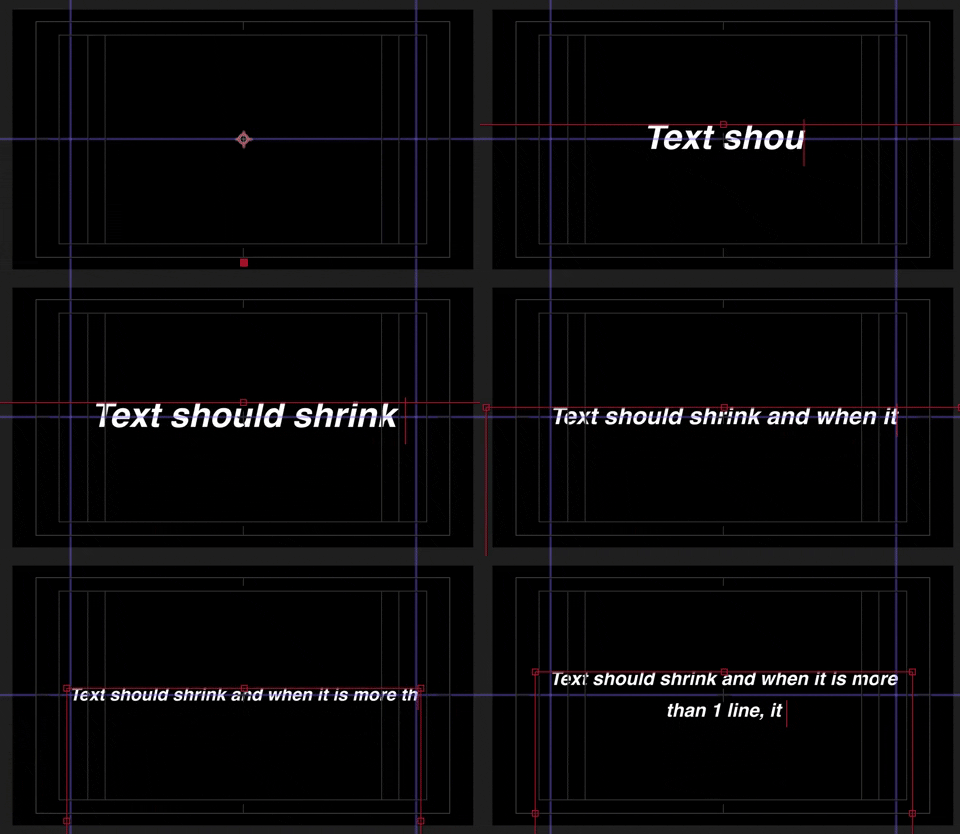
expression for anchorPoint:
myLeading = text.sourceText.style.leading;

h=sourceRectAtTime().height;

x=Math.floor(h/myLeading);
value + [0,myLeading/2]*x;
This can be still combined with an expression for scale that makes lines wider when there are just a few characters, and the textbox will do wrapping if the line gets longer
w=sourceRectAtTime().width;

maxUpScale = 2;

textBoxWidth=1440;
if (w>0) {
s=Math.min(maxUpScale , textBoxWidth/w);
[s,s]*100;
} else {
value
}
-
Vasyl Iskovych
July 9, 2020 at 10:34 pmI am very grateful to you for your help.
Unfortunately, I still did not understand how these expressions work, but they work exactly the way I wanted.
Can I thank you somehow?
Maybe I can somehow pay you for your work?
I will not be able to send a large amount.
But I can offer $ 20- $ 30;
(Please don’t laugh if this is too little for you) -
Vasyl Iskovych
July 10, 2020 at 12:57 pmThank.
I really appreciate your help.
I would like to ask one more question.
Before sending the project to VH, I planned using a script to translate all the expressions into binary code.
For example:
eval (“@ JSXBIN @ ES @ 2.0 @ MyBbyBn0ABJAnAARCFdjYFd2kQBf0DzABByB”)
But such expressions only work if Legacy ExtendScript is installed in the project settings.
And your Anchor Point expression only works if JavaScript is installed.
Is there any way to fix this?
And a good or bad idea, with the conversion of expressions to binary code? -
Filip Vandueren
July 10, 2020 at 3:41 pmI’ve never used binary code, so I don’t know about the compatibility issues.
I think it is more useful to protect your expression when the code is the actual product you’re selling (a script) than when it is just a little helper that complements the design.
The code can probably be altered a bit so it would work in legacy/eval (it probably just needs some thisLayer…. or thisComp… Prefixes), but I wouldn’t bother, personally.
We’ve shared the code here anyway… -
Vasyl Iskovych
July 10, 2020 at 6:38 pmOK.
I understood.
I just saw binary code in several other projects that I was looking at and wanted to do the same.
Its use is not a necessity.
Thank you again.
Reply to this Discussion! Login or Sign Up