-
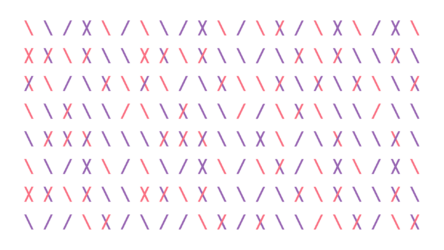
Random reveal of different shapes that keeps changing
Hi there
I have been looking for an efficient solution since 3 days, but either I can’t understand it or I can’t find one. So I hope someone can help.
What I am trying to achieve is to animate a bunch of slashes aligned on a fixed grid 21×8.
<font face=”inherit”>On each Grid Intersection </font>I<font face=”inherit”> need the slash 1, slash 2, to fade on, off or form the X. At the same time the colour should randomly change (3 color values) </font><font face=”inherit”>This should happen in a subtle and totally random way.</font>
Ive tried this way: https://www.youtube.com/watch?v=8MAo1T2rNK4 and changed the position individually. I’ve managed to slow down the reveal and to keep it going using this expression:
on the comp:
holdTime = 5; //time to hold each position (seconds)
seed = Math.floor(time/holdTime);
seedRandom(seed,true);
t = random(0,50);
framesToTime(t);on the layer inside the comp to change the colour:
var color1 = thisComp.layer(“Colour Control”).effect(“Color Control 1”)(“Color”);
var color2 = thisComp.layer(“Colour Control”).effect(“Color Control 2”)(“Color”);
var color3 = thisComp.layer(“Colour Control”).effect(“Color Control 3”)(“Color”);
colors = [color1,color2,color3];
slider = thisComp.layer(“Colour Control”).effect(“Slider Control”)(“Slider”);
engine = Math.floor(time/slider);
seedRandom(engine,true);
colorChoose = Math.floor(random(colors.length));
colors[colorChoose];
I want the change to happen individually at each intersection at a random time and I want it to fade to the other shape (shlash1, slash2, X, nothing).
And Ideally I would love for the colour to randomly change on the individual elements.
And all nice and subtle. Can anyone help me?
Some contents or functionalities here are not available due to your cookie preferences!This happens because the functionality/content marked as “Google Youtube” uses cookies that you choosed to keep disabled. In order to view this content or use this functionality, please enable cookies: click here to open your cookie preferences.