

-
Questions about PP
Hey guys! It’s me again with my newbie like questions. I’ve used Sony Vegas in past but now decided to move on and try the Adobe Premiere Pro. I’m trying to learn it all day long doing the different tutorials I find on Youtube. But sometimes I get stuck with some steps and really struggle to find a solution. So I decided to create this topic where I from time to time will ask different questions about PP. There are several questions that I got so I decided to create one topic for all of them so it doesn’t look like spam or something. I will start with simplest ones and then will move to the hardest ones.
1) When I zoom in the timeline in Vegas it zooms in relatively to the cursor (or idk how this thing is called)

But when I zoom in PP timeline I always lose that pointer and I have to scroll back or further to find it. It’s really annoying. Is there a way to make it like in SV?
2) Here I was going through one of the Justin Odisho’s “How to place a VIDEO inside TEXT” type tutorials and here is what I got.So as you can see from the video I’m just trying to type VLOG word. The first two letters are okay, but when I try to type O – it jumps back and replaces L. What kind of sorcery is that? Then I try to hit Delete button and it deletes the first letter instead of previous. Why is it jumping like that and how do I type VLOG here?
3) Here I’m using pen tool:
when I click on the empty area in order to create the next anchor point… it moves the already made selection and doesn’t make an anchor point. What I’m doing wrong?
4) Here I’m trying to make a map effect – https://youtu.be/CL7GmfrUHew But take a look at my project screenshot.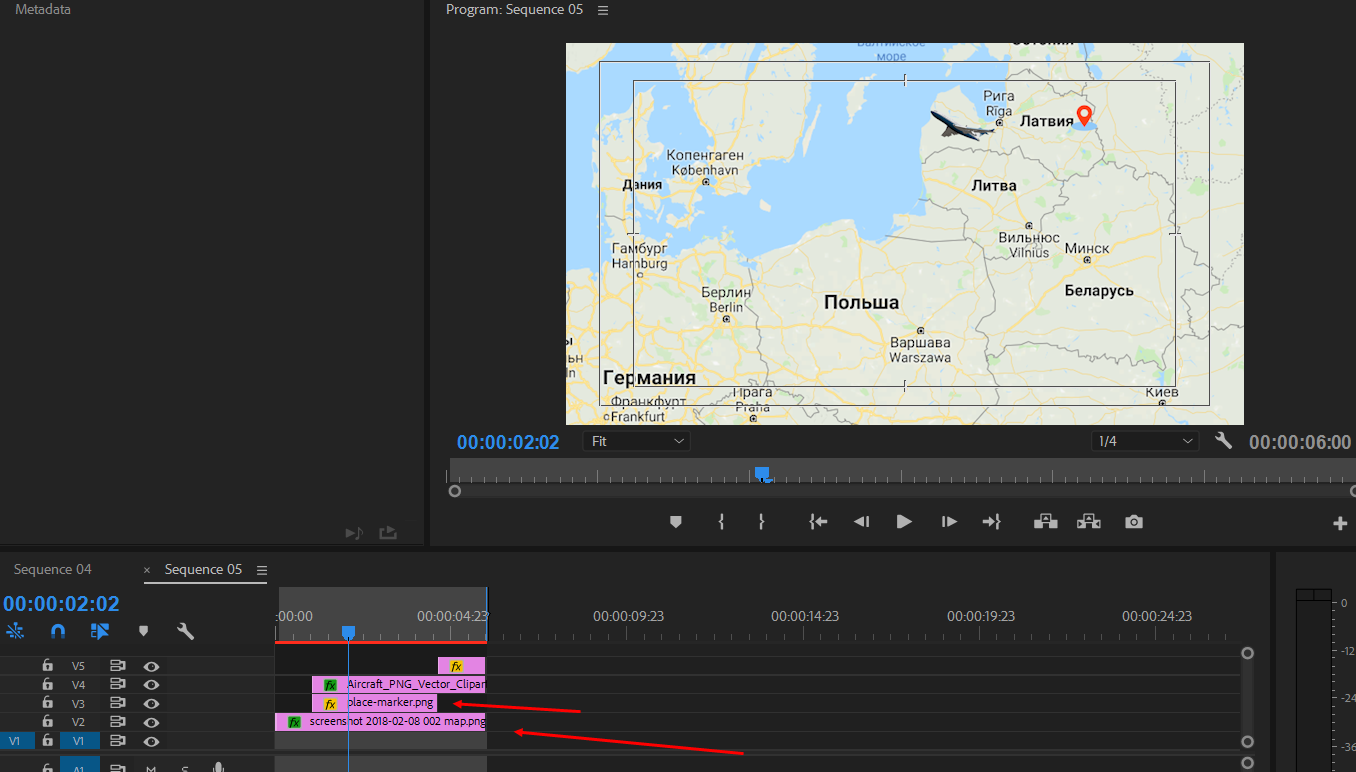
As you can see the map and the place marker are two separate images. Now I want that place marker stays pinned to the country on the top of map while I’m moving the map. Basically I want to pin that place marker in one place. How do I do that?
I tried to Nest the two clips. It works but if I nest the map image and then zoom in nested clip – it gives me a black bars by left and right sides. ☹ I can’t zoom in nested clip as if I could do it with simple image.
5) I’m trying to create a lower third like this: https://youtu.be/5Jr-8W85s7oIn Sony Vegas I’ve used Parent Tracking to make banner and IG logo go in unison. Is there any option like that in Premiere? Because I was searching for it and couldn’t find it.
Some contents or functionalities here are not available due to your cookie preferences!This happens because the functionality/content marked as “Google Youtube” uses cookies that you choosed to keep disabled. In order to view this content or use this functionality, please enable cookies: click here to open your cookie preferences.
Sorry, there were no replies found.