Creative Communities of the World Forums

The peer to peer support community for media production professionals.

Activity Forums Apple Final Cut Pro project clip now says "missing plugin" but the plugin is not identified

  • project clip now says "missing plugin" but the plugin is not identified

    Posted by David Shore on January 12, 2024 at 5:25 pm

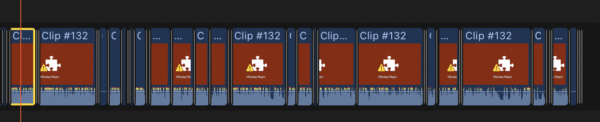
    Opened a project I’ve been working on and suddenly all the edits using a particular clip say “missing plugin” — except that the inspector does not identify any plugins on the clip at all! The clip in the browser also shows “missing plugin” but when the original media is revealed in finder it plays there fine. 1. What’s the issue here? 2. Is there a way to replace all the edits in the project with the original media without having to re-edit everything? Running FCP 10.7.1 Thanks!
    David Shore replied 2 years, 5 months ago 3 Members · 4 Replies
  • 4 Replies
  • Eric Santiago

    January 12, 2024 at 10:17 pm

    I’ve experienced this before and its usually the codec.

    Judging from your example, all clips are affected.
    Unless its a color/lut/look plugin applied to all in timeline.

    Select a clip in that timeline and check the inspector for any anomalies.

  • David Shore

    January 12, 2024 at 10:25 pm

    Thanks Eric….did that, no anomalies shown in Inspector or elsewhere. This exact same clip and the exact same unchanged edits in the timeline worked perfectly yesterday — until I opened the project this morning. Btw, the other clips in the timeline are fine, and they are from the same shoot, shot just minutes before the now suddenly bad clip.

  • Ben Balser

    January 13, 2024 at 4:50 am

    Deleting render files can clear that up a lot of times. Maybe delete pref files, too. If those don’t work, create a new Project. In your original select-all, copy, then paste into the new Project timeline. Sometimes that’ll do it, too. What percentage of your system drive is free space?

  • David Shore

    January 13, 2024 at 3:33 pm

    Saw your response in Apple Forums and IT WORKED! THANKS!

We use anonymous cookies to give you the best experience we can.
Our Privacy policy | GDPR Policy