Creative Communities of the World Forums

The peer to peer support community for media production professionals.

Activity Forums Adobe Premiere Pro Premiere Pro functions not all working with project on external drive

Tagged: 

  • Premiere Pro functions not all working with project on external drive

    Posted by Ann Jackman on August 4, 2023 at 1:08 am

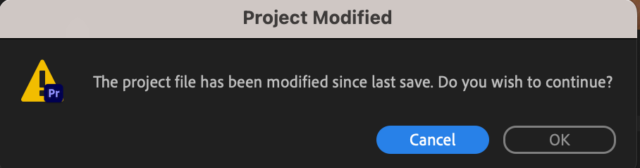
    I recently moved to a MacBook Pro Ventura for work — was previously on a Mac mini. My premiere project and files are all on an external SOFT Raid drive. Everything seemed fine — I could open my project and edit, all my media was there, but when I hit Cmd+S to save, instead of just doing the split-second save, I get the message below. I then have to hit OK to continue. It doesn’t impede my editing, but it is very annoying. I also have found that some shortcuts don’t work, specifically the “go to previous marker” (“go to next marker” does work). I decided to start a new project and save it on the laptop’s hard drive. When I opened that in premiere, everything worked normal — the normal save, my shortcuts were working. It’s only the projects that are on my external drive where I am having this problem. Like I said, I can edit and save and my work isn’t impeded, but it is annoying not having certain shortcuts. I don’t even know yet if there are other shortcuts or functions that don’t work. Any ideas what might be happening?

    Hector Vera replied 2 years, 10 months ago 2 Members · 1 Reply
  • 1 Reply
  • Hector Vera

    August 10, 2023 at 3:32 pm

    Since the external hard drive is not part of the laptop’s Operating system, I am guessing its because it is trying to save in a file path it does not normally recognize and that’s probably why its asking it. Sometimes when I open a Vegas file from a cloud storage, it often asks me to locate each of the files associated with the project unless its completely downloaded to the main drive. Its odd but I believe thats the reason, the OS can recognize file paths within the main drive. There could be other reasons cause sometimes the original file path to the project maybe different from whats on the drive but I would say move the project alongside all the files to avoid this from happening if you have more than enough empty space on your computer. After you are done editing and rendering, just delete the project and the other associated files to save space. Hope it helps!

We use anonymous cookies to give you the best experience we can.
Our Privacy policy | GDPR Policy
