Creative Communities of the World Forums

The peer to peer support community for media production professionals.

Activity Forums Adobe Premiere Pro Premiere FLICKERING LINES in Full Screen Playback

  • Premiere FLICKERING LINES in Full Screen Playback

    Posted by James Scott on June 8, 2021 at 1:46 pm

    HELP! I just took the latest update (Version 15.2.0) for Premiere on my PC and suddenly I’m getting Flickering playback when in Full Screen Mode. But if Premiere is on in the background playing, the flickering lines disappear. (

    I’ve researched and researched and tried all kind of different settings in the NVIDIA Control Panel and Display setting, and I can’t get rid of the flickering lines. And it make it’s really hard to edit. Does anybody know anything about this madness?!

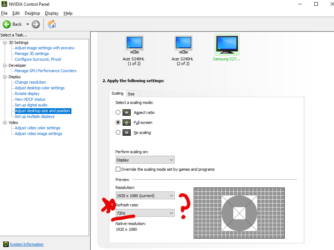
    In NVIDIA Control Panel, I can’t seem to get this refresh rate (pictured) to stay at 60hZ, no matter how many times I Apply that change. Any help much much appreciated… a video of the flickering attached too.

    Thank you!

    Jim
    Ann Bens replied 4 years, 2 months ago 6 Members · 5 Replies
  • 5 Replies
  • Alexandre Cruz

    July 26, 2021 at 1:11 am

    Got the same here, James. Somewhere I read that you should go to NVidia Control Panel:

    Manage 3D settings
    Program Settings (right tab in the middle part)
    Premiere
    Vertical Sync
    choose Use Global Setting

    But even that didn´´’t fix the problem.
    If someone finds it, please share. Thanks.

  • Ricardo Carreira

    August 10, 2021 at 11:37 pm

    Same here.

    I have a ASUS RTX2060.

    Do you think is any problem related with NVIDIA ?

  • David Heitzmann

    September 19, 2021 at 10:48 pm

    Hi

    I have the same problem , on 2 differents windows PC but not on my macbook M1

    It appears all the time since 1 year even not in fullscreen.

    Tell us if you find a solution !

  • Chris Browne

    May 31, 2022 at 12:28 pm

    I found this solution on the Adobe forums worked.

    Go to Nvidia Control Panel > Manage 3D Settings > Program Settings (select Premiere Pro) > Vertical Sync (turn ON).

  • Ann Bens

    June 1, 2022 at 1:59 pm

    Nvidia settings are default on Use 3D app: set it to Adaptive.

We use anonymous cookies to give you the best experience we can.
Our Privacy policy | GDPR Policy