Creative Communities of the World Forums

The peer to peer support community for media production professionals.

Activity Forums Adobe After Effects Pre-Comps & Rasterize switches

  • Pre-Comps & Rasterize switches

    Posted by andy Jackson on November 15, 2020 at 8:49 pm

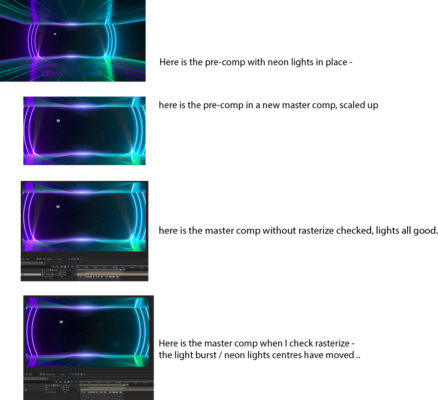
    Hiya, ok so I’m pre-comping my build, so that I can then use it to zoom in & out and move scan around etc in the final comp / render.

    When I check all the assets raster on lossless, I’m getting strange artefacts in the master comp.

    I’m using light burst (as in pic) and when this goes through to the final comp they do not retain their position.

    I think I am missing something in terms oh how the raster switches affect things .. obviously I need all my vectors to be sharp .. but yeah .. confused ..

    hope this makes sense and any help appreciated ..

    Thanks

    Ive attached an image below showing the changes ..

    andy Jackson replied 5 years, 8 months ago 2 Members · 2 Replies
  • 2 Replies
  • Eric Santiago

    November 16, 2020 at 12:32 am

    Vectors and certain effects don’t play well with the Raster option.

    Sorry I would have to play with the file myself to see if there is a workaround.

  • andy Jackson

    November 16, 2020 at 10:15 am

    Hi Eric,

    yes I agree I have found errors before .. just wondered if I was missing something ..

    I have fudged it for now 🙂

We use anonymous cookies to give you the best experience we can.
Our Privacy policy | GDPR Policy