-
Position based on dropdown selection
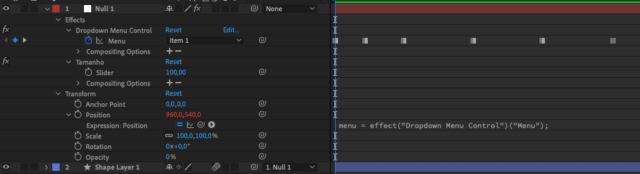
Hey all, I’ve been trying for some time to automate an object in the screen, since it have predefined position that it can be on screen, my first thought was to parent it to a null with a dropdown menu and an expression on the position so that it uses ease() to get from the current position to the next selected position.
I mostly succeeded, but when the next dropdown menu keyframe is nearer than the previous one it resets to the default null position, but when the next keyframe if reached it animates correctly from the previous position to the next, and then jumps back to the center and repeats this behavior.
Am I approaching this wrong? Is there an easier way?
This is the current expression I have right now, some variables have portuguese words
menu = effect("Dropdown Menu Control")("Menu");
var proximoKeyframe = menu.nearestKey(time);
if(proximoKeyframe.time > time) {
	proximoKeyframe = menu.key(menu.nearestKey(time).index - 1);
}else {
}
temp = valueAtTime(proximoKeyframe.time);
pos1 = [960, 800];
pos2 = [150, 150];
pos3 = [1340, 700];
var posDestino;
var previousPos;
transitionDuration = framesToTime(10); // Duração da transição em frames
if (menu.numKeys > 0) {
	nearestMarkerIndex = menu.nearestKey(time).index;
	nearestMarkerTime = menu.nearestKey(time).time;
	previousMarker = menu.key(nearestMarkerIndex - 1);
	temp = valueAtTime(menu.key(previousMarker).time - 0.1);
	switch(menu.key(previousMarker).value) {
		case 1:
			previousPos = pos1;
			break;
		case 2:
			previousPos = pos2;
			break;
		case 3:
			previousPos = pos3;
			break;
	}
    if (time >= nearestMarkerTime) {
		switch(menu.value) {
			case 1:
				if(pos1 != temp) {
					posDestino = pos1;
				}
				break;
			case 2:
				if(pos2 != temp) {
					posDestino = pos2;
				}
				break;
			case 3:
				if(pos3 != temp) {
					posDestino = pos3;
				}
				break;
			default:
				posDestino = previousPos;
				break;
		}
    } else {
		previousPos;
	}
} else {
	previousPos;
}
ease(time, nearestMarkerTime, nearestMarkerTime+transitionDuration, previousPos, posDestino);