Creative Communities of the World Forums

The peer to peer support community for media production professionals.

Activity Forums Adobe After Effects Expressions Please Help me line-up a layer with a camera

  • Please Help me line-up a layer with a camera

    Posted by Drew More on March 23, 2008 at 3:39 am

    I’ve been fighting with this for two nights now, so it’s time to get some help!!

    What I want to do is orient a layer so it passes through the camera. The layer needs to look like a line in the output rendering. I have 3D objects on the layer, and I want to be able to rotate those objects toward or away from the camera in a single visual plane.

    My thought process so far has gone like this:

    Pick two points on the “image plane,” and as we learned in geometry class, a third point should define a plane. I want to use the camera’s position as my third point, and so have a layer that appears to the camera as just a line at some angle. As an aside, that angle should be the same as the angle of those first two points on the image plane.

    pos=thisComp.activeCamera.position;
    posZ=-pos[2];
    // isolates the Z-position of the camera,
    // makes it positive.

    point1= …
    point2= …
    // any two 2D points,
    // I’ve got them tied to Point Controls, fwiw.

    // Now I’m going to find the angle
    // of the line that those two points
    // define…
    vect1=sub(point2,point1);
    Ang1=Math.atan2(vect1[1],vect1[0]);

    // Now I’m trying to find the angle of a line
    // formed by the first point
    // and the center of the comp…
    pointC=[360,240];
    Vect2=sub(pointC, point1);
    Ang2=Math.atan2(Vect2[1],Vect2[0]);

    // I subtract these two angles
    // and use that to calculate the minimum distance
    // from the first line and the center point
    Ang=(Ang2-Ang1);
    d=-length(Vect2)*Math.sin(Ang);

    // Now I have a new triangle to trig out:
    // “d” is the short leg of a slim triangle
    // “posZ” is the long leg of this triangle: the distance
    // to the camera position.
    // So this final calc should give the angle that
    // I should rotate the layer/plane to touch the
    // Camera’s position…
    x1=(d/posZ);
    ((radiansToDegrees(Math.atan(x1)))+90);
    ^^^^^^^^^^^^^//Pass this value

    On paper it looks right, and I’ve checked each line and they all give the numbers I expect. However, the layer I’m rotating does not appear to be a line: I’m off by between 0.5 degree and 2 degrees depending on the angle of the first two-point-line. So there’s something wrong with my approach here, I guess.

    Help, please!!! I’d love someone to straighten out my code, or show me the ‘right way,’ to get this done!!

    -drew

    Drew More replied 18 years, 1 month ago 2 Members · 4 Replies
  • 4 Replies
  • Drew More

    March 23, 2008 at 1:37 pm

    I left out a detail:

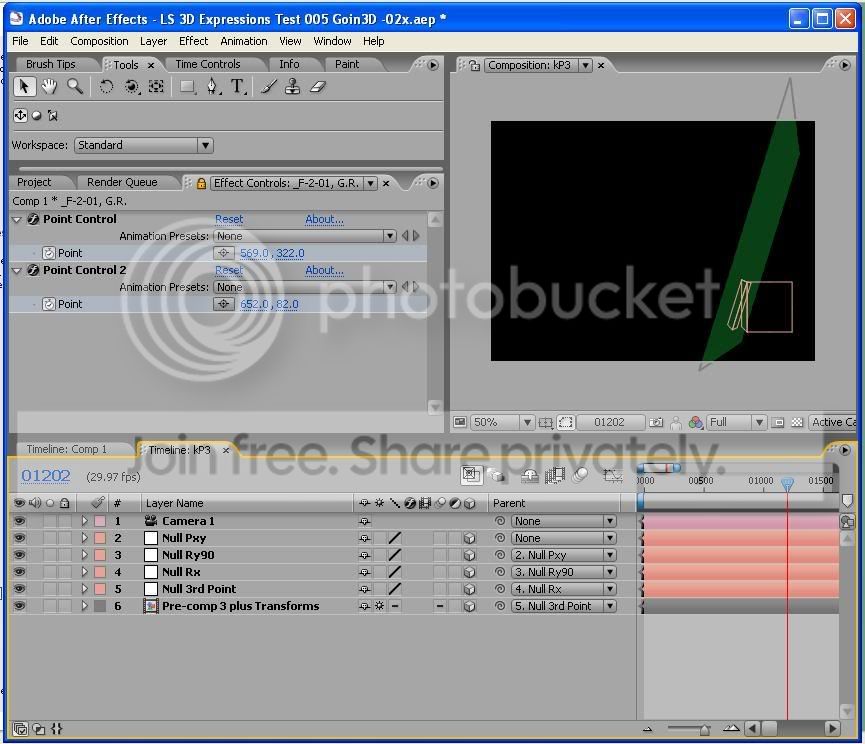
    I’ve got nested Nulls,
    the first moves the whole thing to the x,y Position of the first point.
    the second rotates it’s children about the vertical axis
    to be perpendicular to the
    image plane
    the fourth the third turns the layer to match the second point
    the fifth is where I lose it…

    -drew

  • Filip Vandueren

    March 23, 2008 at 3:32 pm

    Hi Drew,

    here’s how I would fix it:

    I have a 3D Null with 2 point-controls on it.
    Next, a Null with these expressions:

    position:

    l=thisComp.layer("Null 2");
    p1=l.toWorld(thisComp.layer("Null 2").effect("Point Control")("Point"));
    p2=l.toWorld(thisComp.layer("Null 2").effect("Point Control 2")("Point"));

    (p1+p2)/2;

    Orientation:

    l=thisComp.layer("Null 2");
    p1=thisComp.layer("Null 2").effect("Point Control")("Point");
    p2=thisComp.layer("Null 2").effect("Point Control 2")("Point");

    v=value+(p1-p2);

    r=radiansToDegrees(Math.atan2(v[1],v[0]));

    [0,0,r]

    Furthermore:

    enable Auto-orientation towards Camera
    set the X rotation to 90.2°
    (If you set it to exactly 90°, the line dissapears).

    You can animate the point-controls and the Null will be a line connecting them.
    You can move the entire Null in 3 plane s and that works too as an offset. I believe that’s why you needed the Null pxy.

  • Drew More

    March 24, 2008 at 1:44 pm

    Thanks for looking at this for me, Phillip!!

    Your ‘furthermore’ section is huge for me: I never thought about the auto-orient feature: I had been trying to program that function from scratch!! I’ll have to try it to be sure (I’m at work right now…), but that sounds like exactly the sort of inspiration I needed on this!!

    Thanks agian,

    drew

  • Drew More

    March 24, 2008 at 8:17 pm

    Yes Fillip, That totally works!!!

We use anonymous cookies to give you the best experience we can.
Our Privacy policy | GDPR Policy