Creative Communities of the World Forums

The peer to peer support community for media production professionals.

Activity Forums DaVinci Resolve Pinning 2d image in 3d to source footage

  • Pinning 2d image in 3d to source footage

    Posted by Dylan Tucker on March 2, 2022 at 12:38 am

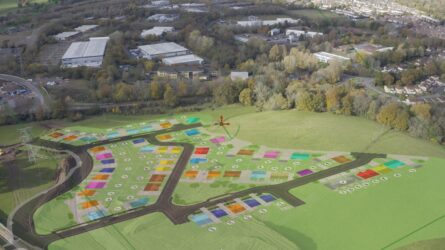
    Hi all – I’ve been using Resolve for a while but really haven’t got my hands too dirty in fusion. I’m experimenting with a task where I need to overlay a map of property developer’s land; have tried all sorts of combinations using the camera tracker but I’m finding that it’s impossible to position the image on the ground plane and have the perfect positioning which is important for a job like this. I can do things like add 3d text and other smaller elements no problem, but with a large flat 2d image like this its tricky. I was wondering if anyone knew of a way that I could portions of an image to the tracking points in the original footage. For example, i could pin a portion of the image to stick to a telegraph pole, and another to the edge of the road etc, and then as the camera tracker the image would just stretch accordingly, but always be fixed in the correct place. This seems the kind of solution I am after, and I was wondering if anyone knew how it could be done? Example included of just quick output of the camera tracker setup to show what I’m trying to achieve.

    Thanks!
    Michael Gissing replied 4 years, 2 months ago 2 Members · 1 Reply
  • 1 Reply
  • Michael Gissing

    March 2, 2022 at 2:41 am

    It’s simple job for the Fusion planar tracker and then using the corner pin mode. Casey Faris did a nice simple tutorial on this recently.

    https://www.youtube.com/watch?v=ws5MztaqvyE

    He goes into more detail about tracking with objects getting in the way in the foreground but I don’t think this is your issue here. If you follow his guide through a basic track and corner pin you should have the solution to your problem. Fusion is scary and I am a bit hesitant but luckily people like Casey unpack it really well.

    Some contents or functionalities here are not available due to your cookie preferences!

    This happens because the functionality/content marked as “Google Youtube” uses cookies that you choosed to keep disabled. In order to view this content or use this functionality, please enable cookies: click here to open your cookie preferences.

We use anonymous cookies to give you the best experience we can.
Our Privacy policy | GDPR Policy