

Activity › Forums › Adobe Illustrator › Paths don’t have any reaction, is that a bug?
Tagged: Basic
-
Paths don’t have any reaction, is that a bug?
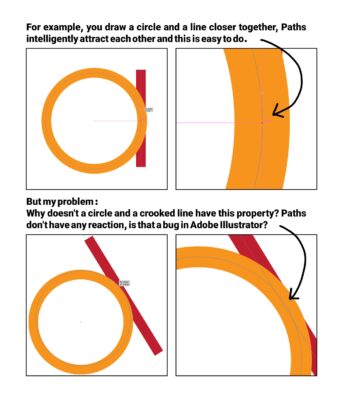
Posted by reza ezoji on January 22, 2024 at 10:36 pmPaths don’t have any reaction, is that a bug?😫
My question and problem is in the image(uploaded) Tom Morton replied 2 years, 8 months ago 2 Members · 1 Reply
 -
1 Reply
-

Tom Morton
January 23, 2024 at 1:57 pmThe smart snapping guides work off points by default, not splines. Illustrator also intelligently adds “midpoint” point for snapping – it isn’t a real point but appears when snapping to objects.
On the first example, the snapping guides appear because the end points of the line are vertically in line with the right point on the circle. The auto-generated midpoint also appears as a helpful guide. because it’s between the 2 points.
On the second example, you’re putting a spline near a spline so no snapping guides appear. Snapping also occurs horizontally and vertically by default, so because no points relate to one another, you don’t get any snapping guides. If you move the end point of the line near the circle, you should get snapping guides by default, but not for splines.
The reason for this is because splines are not controllers, they are the output of the points – so you can’t put a spline in a location without using a point to give it directions to go there. A bezier point with handles will give directions for where the spline path should go, and you can snap the point and the handles, but the line just an output so snapping guides would be irrelevant.
Reply to this Discussion! Login or Sign Up