Creative Communities of the World Forums

The peer to peer support community for media production professionals.

Activity Forums Adobe After Effects Expressions Opacity vary from 0 to 100 with 2 markers

  • Opacity vary from 0 to 100 with 2 markers

    Posted by Jean Livenais on April 23, 2024 at 2:37 pm

    Hello,

    I d’like to vary the opacity of one layer based on a sequence of 2 markers.

    One marker is named “S” for Show, and the other is “H” for Hide.

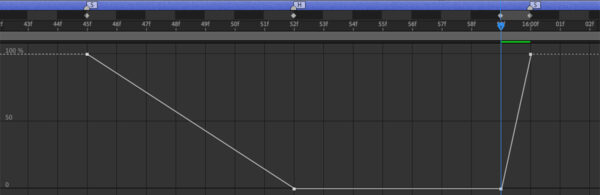
    Id’like the opacity to go from 100, at the S marker, to 0 at the H marker with a linear fade,

    and go from 0, one frame before the S marker, to 100 at the S marker.

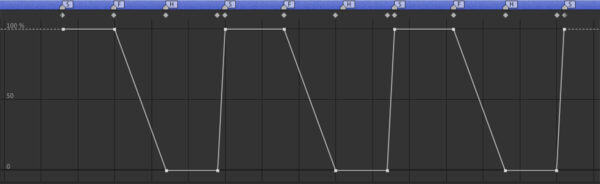
    I attached an example of the opacity variation according to the markers names.

    Is it possible to make it work for a long sequence of these 2 markers?

    Thank you for your help.
    Brie Clayton replied 2 years, 3 months ago 3 Members · 5 Replies
  • 5 Replies
  • Dan Ebberts

    April 23, 2024 at 3:22 pm

    If there will be more than 3 markers in the sequence, I think you need to show how that looks after the 3rd marker, because it’s not clear (to me at least). But yes, there should be an algorithm that works, once you define all the rules.

  • Jean Livenais

    April 23, 2024 at 5:59 pm

    Yes, it wasn’t clear… we would need a third marker named “F” for Fade, with 100 opacity, where it starts to fade until the “H” marker.

    So the marker’s sequence would be:

    S = 100 opacity

    F = 100 opacity, and it starts to fade until the “H” marker

    H = 0 opacity, until 1 frame before S

    S = Goes back to 100 opacity

    F

    H

    The sequence would be S F H that repeats in this order.

    Here you can see the variation of the opacity would be like with more than 3 markers.

  • Dan Ebberts

    April 23, 2024 at 6:40 pm

    OK, so it would be something like this:

    m = thisComp.marker;
    val = value;
    if (m.numKeys > 0){
    n = m.nearestKey(time).index;
    if (time < m.key(n).time) n--;
    if (n > 0){
    c = m.key(n).comment;
    if (c == "S"){
    val = 100;
    }else if (c == "F"){
    if (n < m.numKeys){
    val = linear(time,m.key(n).time,m.key(n+1).time,100,0);
    }else{
    val = 0;
    }
    }else if (c == "H"){
    val = 0;
    }
    }
    }
    val

    It could be more complicated, for example, if there could be markers that don’t have a comment of “S”, “F”, or “H”, or you have them in the wrong order, but this should give you the idea. This is set up for comp markers. If you want to use layer markers, just change the first line to:

    m = marker;
  • Jean Livenais

    April 23, 2024 at 6:54 pm

    It’s working perfectly.

    Thank you Dan for taking the time to solve this idea.

    It’s great to have people ready to help.

  • Brie Clayton

    April 24, 2024 at 1:25 am

    Thank you for solving this issue, Dan!

We use anonymous cookies to give you the best experience we can.
Our Privacy policy | GDPR Policy