Creative Communities of the World Forums

The peer to peer support community for media production professionals.

Activity Forums Adobe After Effects Only part of file is being played in timeline

  • Only part of file is being played in timeline

    Posted by Moxy Child on December 15, 2020 at 6:40 am

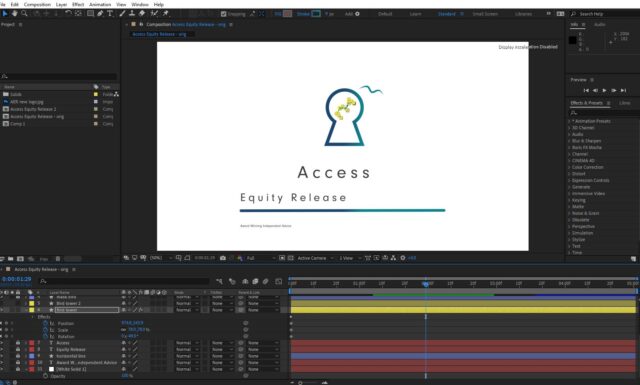
    I am trying to play all 5 seconds of this motion graphic, but only the area in green is being played. If i move the CTI it plays about the same duration from there too. I have checked the work area is full length and the composition settings start at 0 and duration is 5 seconds. this is the second time it has happened. Last time I was just playing. this time it is for a client.

    I really look forward to receiving some help.

    Michael Szalapski replied 5 years, 5 months ago 4 Members · 4 Replies
  • 4 Replies
  • Dave Baum

    December 15, 2020 at 8:49 am

    Hi Moxy – you’ve just run out of ram to preview.

    Try going to the top menu bar in After Effects and selecting >edit >purge, then select “all memory and disk cache”

    You will then need to ram preview the timeline area again.

    If after that you still cannot preview the whole thing, try previewing the comp at a lower resolution. If you’re not sure how to do that I can upload a screenshot.

    If that still doesn’t work, then you’ll have to buy some more ram!

  • Dave Baum

    December 15, 2020 at 10:31 am

    Actually, I think you can forget the RAM comment – its your cache which is full, but purging will free it up to whatever space you have. You can allocate more space to this in preferences

  • Chris Voelz

    December 15, 2020 at 1:16 pm

    You can also change your Preview settings to play from current time. This will start your cache from wherever your scrubber is in the timeline. Or alternatively set your work area to the section you want to preview.

  • Michael Szalapski

    December 17, 2020 at 3:18 am

    Note that you can have different settings for different key commands for previewing.

    For example, I have it set up to where pressing 0 on my number pad initiates a preview from the beginning of the work area, but pressing spacebar initiates a preview from where the Current Time Indicator is.

    Note also, that you can have different behaviors when you press the key commands to stop a preview too. For example, I have it set up to where pressing 0 on the number pad while a preview is caching will stop it from caching and start playing back the cached frames then pressing numpad 0 again will make it go back to where the CTI was originally. Whereas pressing spacebar will just stop the preview and move the CTI to where it was playing/caching.

    You can customize the CRAP out of your previews in AE and it’s wonderful.

We use anonymous cookies to give you the best experience we can.
Our Privacy policy | GDPR Policy