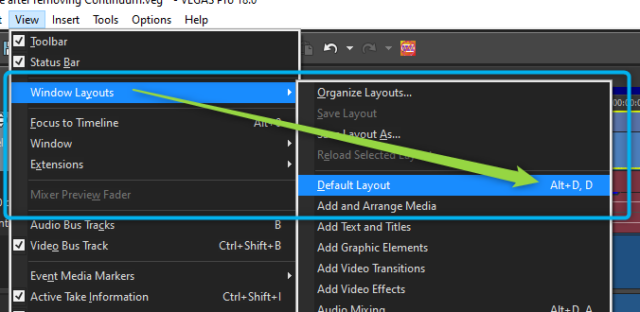
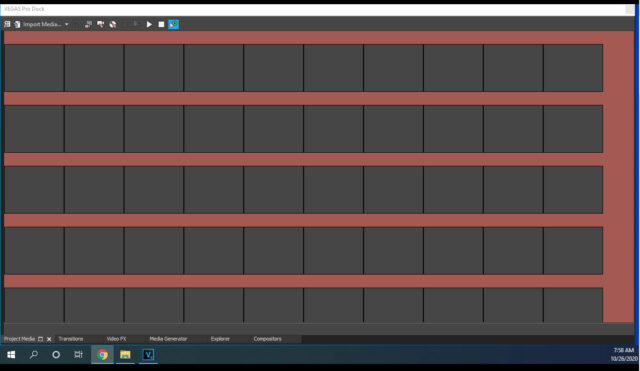
Activity › Forums › VEGAS Pro › No Thumbnails image in Program Media folder Pro 18 VEGAS Pro No Thumbnails image in Program Media folder Pro 18 Posted by Duane Weed on October 26, 2020 at 12:04 pm Loaded a project, the video in the project media folder shows no images on the thumbnails See Image – Any ideas? Graham Bernard replied 5 years, 6 months ago 3 Members · 4 Replies 4 Replies Duane Weed October 26, 2020 at 7:02 pm None of images are showing up. I can load a new video and it goes to the timeline and does not show up in the media folder. Any ideas – wow, have 18 for one hour and already frustrated with something weird happening. Help please. Derek Blume October 26, 2020 at 7:08 pm You are currently looking at the storyboard option and you are in a strange configuration with the tree view missing on the right. Hold down Alt and press D twice to reset everything. Duane Weed October 27, 2020 at 10:45 am THANK YOU!!!!! Graham Bernard October 27, 2020 at 11:42 am Yeah – ALT,D,D is the Windows Layouts Default: Reply to this Discussion! Login or Sign Up Public All Members My Connections Only Me PublicAll MembersMy ConnectionsOnly Me Public All Members My Connections Only Me Reply to this Discussion! Login or Sign Up