Creative Communities of the World Forums

The peer to peer support community for media production professionals.

Activity Forums VEGAS Pro New audio track color in V17 unable to change

  • New audio track color in V17 unable to change

    Posted by Chris Hewitt on October 2, 2020 at 5:36 pm

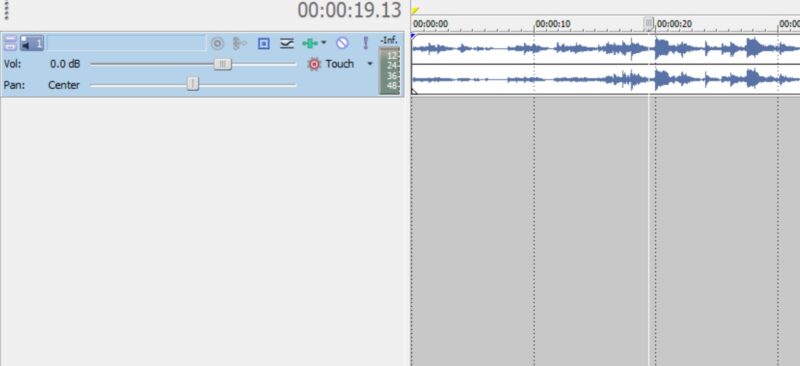
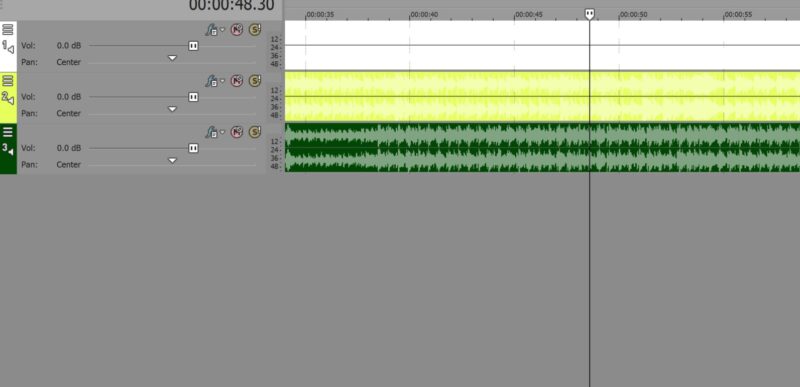
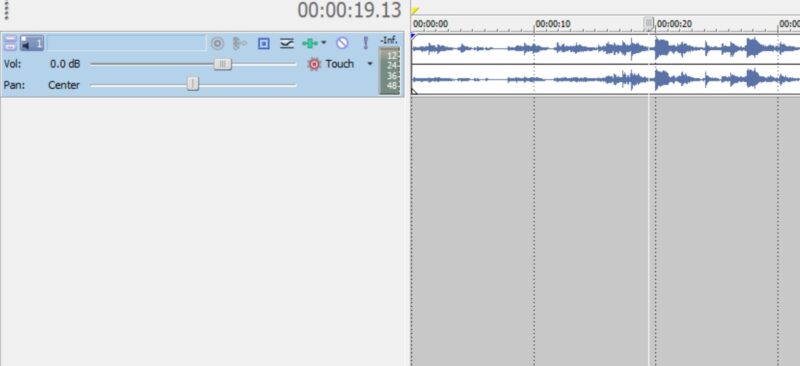
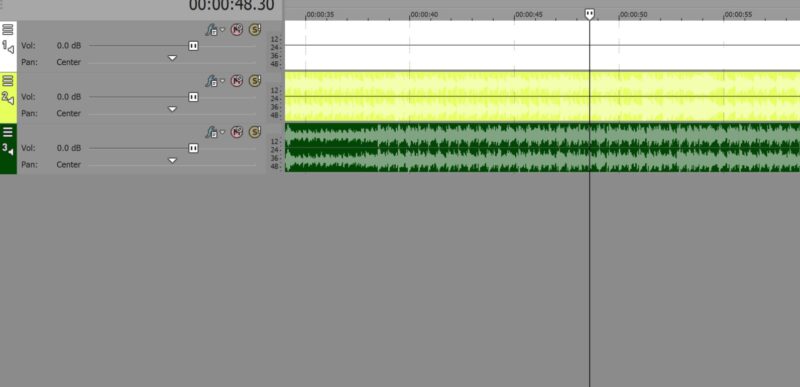
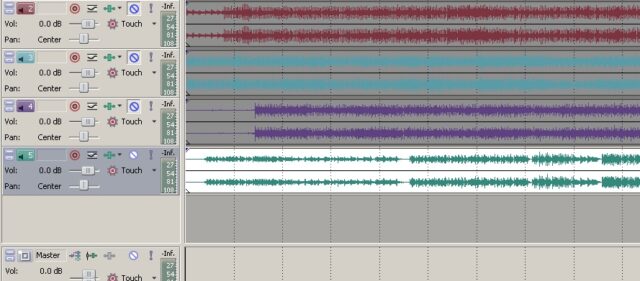
    I’ve been using Vegas Po since v5 but recently migrated to Vegas Pro 17 from Vegas Pro 12 and I’m almost tempted to go back. The main issue are the audio tracks on the timeline. Where they used to be white by default (see attached photo from V-Pro 12) and a colored audio wave form (which made the audio so easy to see), the audio wave form is now the same color as the track itself, just a slightly different shade. Really hard to see.

    Is there any way to have the tracks white and the audio wave form whatever color, something like dark green, like it used to be? I’ve looked at the obvious choices such as the Options/Preferences/Display panel but no luck. I’d really appreciate any help.

    Chris Hewitt replied 5 years, 8 months ago 3 Members · 5 Replies
  • 5 Replies
  • Steve Rhoden

    October 2, 2020 at 6:10 pm

    Right click on the track panel (far left) and a list will come up, then you press “Track Display Color” then you select whatever color you like. There you can customize things even more further.

  • Chris Hewitt

    October 2, 2020 at 6:32 pm

    Hi Steve, thanks for your reply. I had looked at that but it’s not the problem as such. For instance, if I add a new audio track and drop an audio file onto that track, the event will be whatever color the “Track Display Color” is set to. The issue is that the audio waveform is the same color, especially so when the track is not selected.

    I’m actually trying to make that waveform a dark color in relation to the background color of the event. I’ve attached two screenshots. The first is from Vegas Pro 12 and shows the white event background color when that track is selected. All good and easy to see.

    The second screenshot shows VP17 with the same audio tracks but as you can see, the color backgrounds of those events are much harder to read the waveform. If you have a white background, you can’t even see the waveform but it’s there.

    So, all I want to do is have VP17 show what VP12 is showing on the left in the first screenshot.

    I can’t see any way of achieving this.

  • Edward Troxel

    October 2, 2020 at 7:25 pm

    Under Options – Preferences – Display, make sure none of the available “Track Colors” are very light colors? White and yellow are not even options by default for track colors.

  • Chris Hewitt

    October 2, 2020 at 7:26 pm

    Aah, I’ve found the answer. It’s in the Preferences/Display panel and I had to tick the box ‘Reverse Event Background Color’…..it’s not an option in Vegas Pro 12, must be new.

    Thanks for your help, Steve.

  • Chris Hewitt

    October 2, 2020 at 7:51 pm

    Yes, that certainly affects it, Edward. Anyway, I’ve got it looking good now by using that new option box. Thanks Edward.

We use anonymous cookies to give you the best experience we can.
Our Privacy policy | GDPR Policy