-
need help with project (tight schedule)
hi guys,
i know asking to be “spoonfed” information is kinda frowned upon but im kinda new to AE and im on a tight schedule. i could really use some help. im taking AE classes and im quite versed in the areas ive been learning so far but this particular one hasnt been touched on yet in the course im following. i did the best i could with my current knowledge but im trying to see if theres an easier and more convenient way(or trick) to do it.
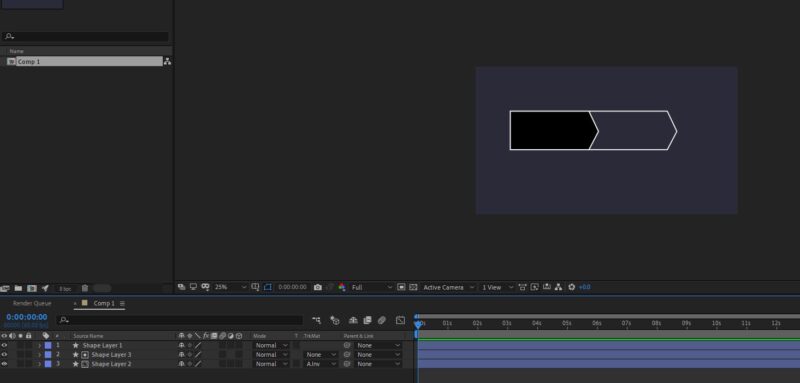
-first of all, heres the final result im trying to replicate(picture 1).im trying to create this kind of grid for imputs.im doing it manually, however i think there would be a better way by adding repeaters maybe?i just dont know how to make it work
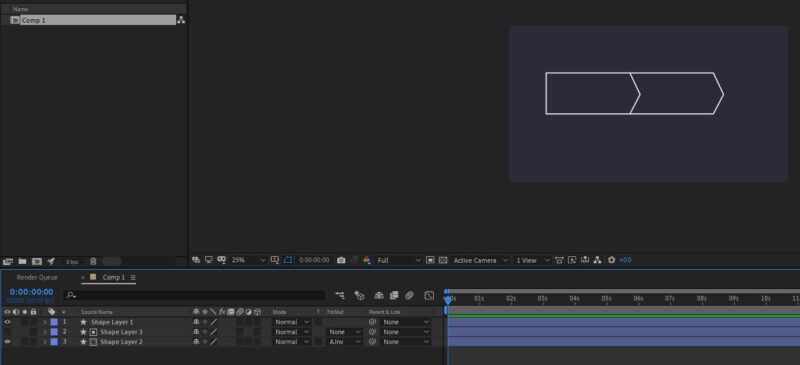
-(pictures 2 and 3 are how i do it). i duplicate the first shape layer,fill with black,add alpha inverted to the second shape layer,and set the black one to invisible (and rinse and repeat until i get them all i guess)
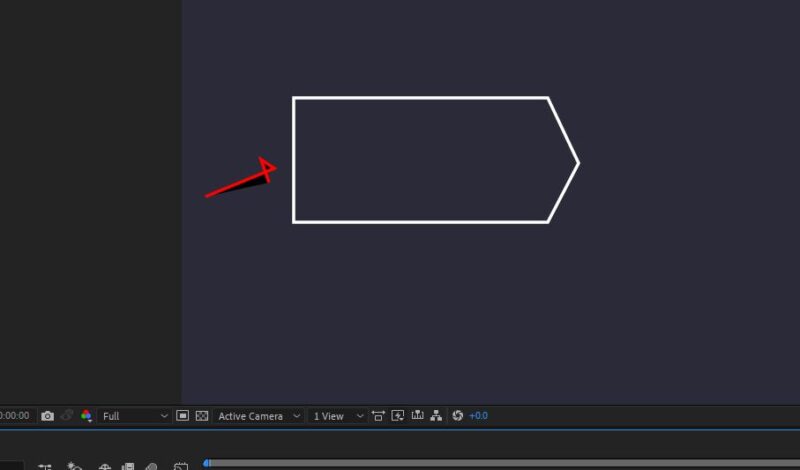
-now, what i’d like to do would be to just delete the vertex shown in (picture3).but i cant seem to do it.i tried the vertex delete pen tool but it doesnt work
-and another thing.is there a way to make shapes in ae act like vector graphics?
meaning, i would like to resize them at will without actually stretching them.i would just redraw them.cause for example if i were to elongate this rectangle ,the pointy side would get thicker .
-also, is there a way to resize things like you would in a precomp without actually making a precomp?cause now if i select all the shapes and resize they resize to their own anchor point.i tried to play around with anchor points but nothing is working
so in conclusion. could anyone recomend a faster and more efficient way or workaround to achieve what im looking for? (remember, the empty space inside the shape needs to be “flexible” to accomodate different lenghts of inputs. they arent always the same. it depends.so i also need a way to quickly adjust each shape to fit my needs for each particulat slot.
thank you in advance for the help (im trying my best but im on a schedule and running out of time)