Creative Communities of the World Forums

The peer to peer support community for media production professionals.

Activity Forums VEGAS Pro Neat Video

  • Neat Video

    Posted by Josh Jones on June 24, 2021 at 1:37 pm

    Do any of you have any ideas on how to get Neat video to remove the grain of video with out losing the over all clarity? I am scanning old 8mm film frame by frame. Neat seems to do a great job over all but make things seem a little out of focus.

    The plugin that come with Vegas Pro does not seem to do very good at all. Are there any other suggestions?

    Josh Jones replied 4 years, 10 months ago 3 Members · 4 Replies
  • 4 Replies
  • Red-rob Rothkopf

    June 24, 2021 at 3:15 pm

  • Red-rob Rothkopf

    June 24, 2021 at 3:16 pm

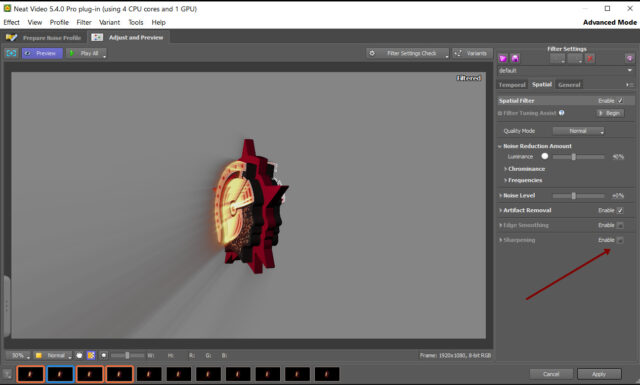
    If you haven’t already, try enabling the “Sharpening” option on the “Spatial” tab page under “Filter Settings”. (on the “Adjust and Preview” page). I usually enable that and it restores the crispness quite nicely 🙂

  • Richard Swain

    June 24, 2021 at 3:29 pm

    I have been using Neat for many years. There is a trade-off of grain removal vs image blurriness. Sometimes you can play with the temporal and spatial settings and find something which works. Generally I let the image clarity win and allow some grain. I have found that Topaz Video Enhancer AI does an incredible job of removing the grain while not blurring the image. It is an expensive option. Topaz has a free trial. It is not a plugin for Vegas. I run the newly captured video (I capture mostly 8mm, S8mm and 16mm) through the Topaz software and take that output (an MP4 file) as the input to Vegas. The software is a resource hog – likes a good video card and lots of memory, but works great. Grain is the big issue with 8 & S8 film. Dirt isn’t “noise” and isn’t removed by either product.

  • Josh Jones

    June 25, 2021 at 1:41 pm

    Thank you for the suggestions!!! I will give those a try…

We use anonymous cookies to give you the best experience we can.
Our Privacy policy | GDPR Policy