Creative Communities of the World Forums

The peer to peer support community for media production professionals.

Activity Forums Adobe After Effects Expressions Navigating on a map

  • Navigating on a map

    Posted by Ace Billet on November 5, 2020 at 9:31 pm

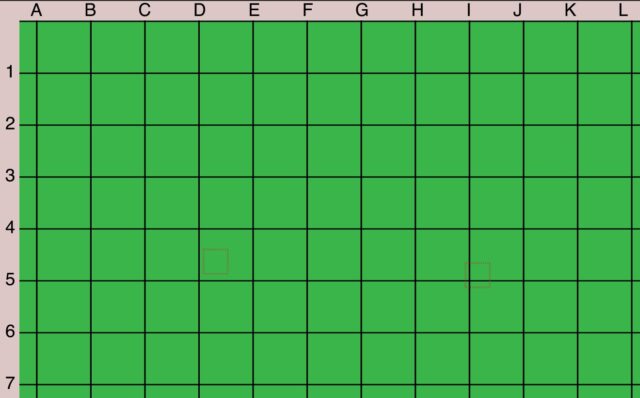
    I have a map that I want to travel on.
    The map has a coordinates grid.
    I would like the letter and numbers to travel with the map, but stay locked in their positions.
    I locked the coordinate letters and numbers to move only on their axes.

    The problem starts when I want to zoom in on the map – I would like the coordinate letter and numbers to space out based on the expanding grid.
    So each letter stays positioned next to their grid line. So when we zoom in the grid lines expand, and their letter should follow.
    I’m trying to parent the z position of the camera null to the x property of the letter. However, the ratio is not constant – as objects farther from the camera null require a larger multiplier to move.
    Any way to do this?
    Ace Billet replied 5 years, 6 months ago 1 Member · 1 Reply
  • 1 Reply
  • Ace Billet

    November 6, 2020 at 4:49 pm

    Solved this! Zoom in and out on the map work as needed – the letter and numbers space.

    I used to.Comp –

    Created 3D nulls on the end of each grid line. Each null had a matching name to the letter / number it locks.

    For example, to have the D stay locked to the grid line:

    [thisComp.layer(“Null_D”).toComp([0,0,0])[0],45]

We use anonymous cookies to give you the best experience we can.
Our Privacy policy | GDPR Policy