-
Multiple opacity checkbox and opacity slider (stack multiple opacity expression)
Hello friends I am new here :), I am not familiar with If/Else Condition, and I tried many times to find the right Expression for my template, where my team can able to do some desired opacity settings.
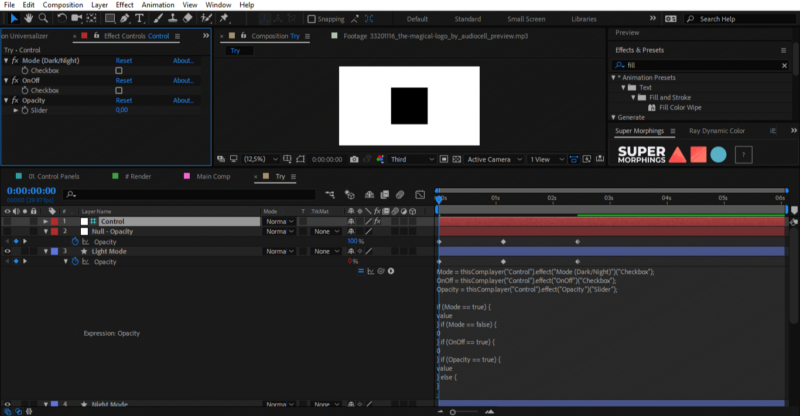
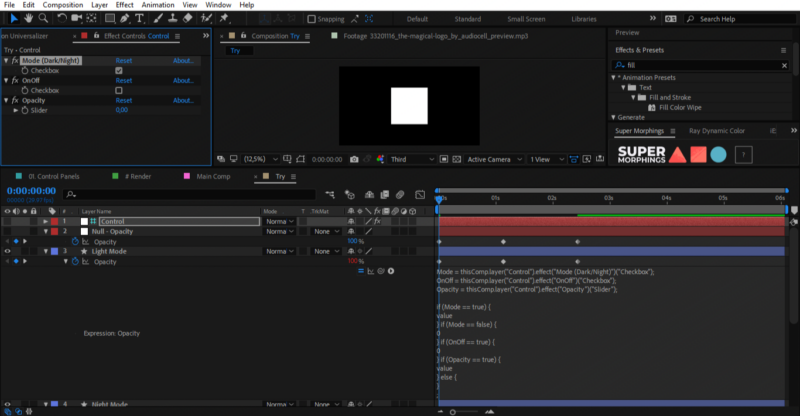
Here I created an example with 2 Opacity Checkbox and 1 Opacity Slider.
The first Checkbox functions to switch Light and Dark modes, the second Checkbox functions to disable elements if they don’t want one of them (in real case I using many elements), and for the Slider where they can adjust the Opacity thickness if the second Checkbox (OnOff) is not checked, but the Slider will not work if the second Checkbox (OnOff) is checked in the sense Slider must be set to 0, and here is the main problem – it doesn’t work.
It can if I make additional Opacity using Solid Composite or Transform that applied on Effects box special only for Slider Opacity, but it looks messy for me and I want to keep it simple stack in one Expression only.
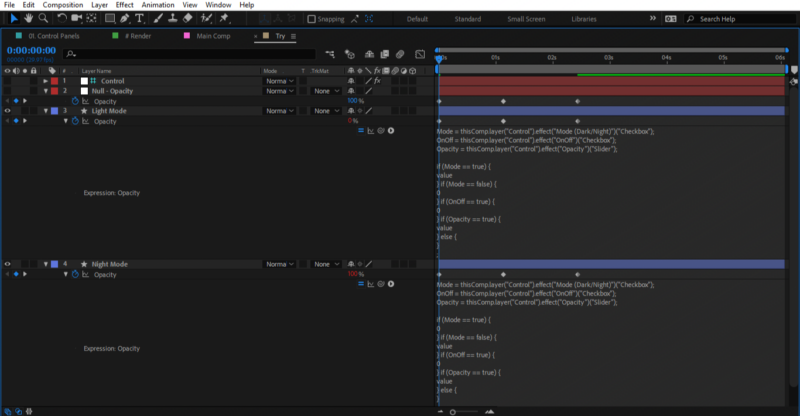
Here I use “value” between curly brackets to keep layers working fine if they contain keyframe, but can this also working fine in case if the Opacity is linked to another layer (Example linked to layer “Null – Opacity”) so that I can put Expression working properly.
//Here is my content
Mode = thisComp.layer(“Control”).effect(“Mode (Dark/Night)”)(“Checkbox”);
OnOff = thisComp.layer(“Control”).effect(“OnOff”)(“Checkbox”);
Opacity = thisComp.layer(“Control”).effect(“Opacity”)(“Slider”);
if (Mode == true) {
0
} if (Mode == false) {
value
} if (OnOff == true) {
0
} if (Opacity == true) {
value
} else {
}
;
===/////===
Thank you!