

-
Multiple audio tracks
Posted by Dirk Wellekens on August 4, 2025 at 10:40 pmHello,
I just switched from Vegas 16 to Vegas 22 (just making home videos). When I drag an m2ts event to the timeline, in Vegas 16 it used to create 1 audio track, while I get multiple tracks in Vegas 22 when doing the same. Is this managed by a certain setting and can I have only 1 audio track in Vegas 22 as well?
Dirk Wellekens replied 1 year, 1 month ago 2 Members · 2 Replies -
2 Replies
-

Derek Moran
August 6, 2025 at 7:40 amHi Dirk
It sounds like the .m2ts videos you are working with, have been recorded with 5.1 Surround Sound Audio. As far as I am aware, there was a bug in VEGAS Pro 16, that made 5.1 Audio look like Stereo on the timeline, unless you manually changed the audio Project Property Settings, before you imported your video. Open Project Properties and check Audio / Master Bus Mode.
If a video file contains a standard Stereo Audio stream, the audio should import into the VEGAS Pro timeline on one track and you will see 2x audio waveforms – one for the Left channel and one for the Right channel.
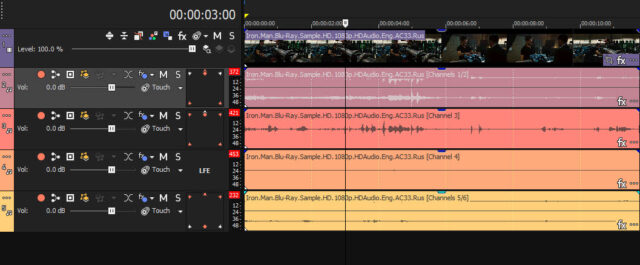
However, if your video contains a 5.1 Surround Sound audio stream, it will create 4x separate Audio Tracks.
Track #1 = Video stream
Track #2 = Audio stream for Front Left / Front Right channels
Track #3 = Audio stream for Center channel
Track #4 = Audio stream for LFE (Low Frequencies)
Track #5 = Audio stream for Back Left / Back Right channelsIs your .m2ts video in VEGAS Pro 22, creating 4x Audio Tracks, as described above?
If it is, your video is definitely using 5.1 Surround Audio.Another test: Open VEGAS Pro 16.
Before you import your video, open Project Properties for Audio and set to 5.1 Surround.
Now import your video. Does it show 4x Audio Tracks now?If 5.1 Surround audio is confirmed, 4 tracks is correct. You can render down to Stereo, if this is what you prefer.
Another test you can do, is use a free app called Media Info and use that to inspect your video files, to see what type of Audio Streams they contain. If your not familiar with Media Info, please read/watch my tutorial here:
https://www.moviestudiozen.com/free-tutorials/other-software/how-to-use-mediainfo-appRegards
Derek
-

Dirk Wellekens
August 6, 2025 at 5:50 pmHi Derek,
Thanks a lot for your reply.
If I set my audio to 5.1 Surround in Vegas 16, I indeed get 4 audio tracks. If I set it to Stereo I get only 1 audio track (why not 2). However, when I import in Vegas 22 I get 6 (not 4) audio tracks, no matter if I set it to 5.1 Surround or Stereo. I don’t get it.
When I right click and drag a clip and choose “add as take”, then I get only 1 channel. This is maybe an option for me, but I don’t know if this approach would have any disadvantages (in terms of speed,…)
As it is not a professional video and the audio is mostly replaced by back-ground music I want to avoid having to edit 4 or 6 tracks instead of 1.
Best regards,
Dirk
Reply to this Discussion! Login or Sign Up