Creative Communities of the World Forums

The peer to peer support community for media production professionals.

Activity Forums Adobe Premiere Pro Multiband compressor settings…

  • Multiband compressor settings…

    Posted by Andrew Johnstone on March 11, 2021 at 9:11 am

    I am back cutting in PP for the next month having been away on FCPX for about 3 years…and I seem to have forgotten where some of the knobs & button are.

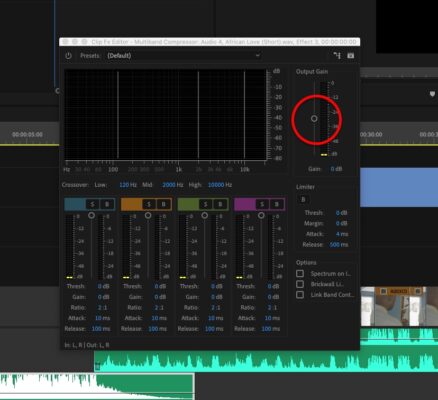
    One of my fav effects plugins is/was the multiband compressor. It is a great way to mash a track to Broadcast standards etc. I am currently laying back VO from some dubs and doing a mix for broadcast. I have slapped on the compressor but for some reason the master slider seems to be set at about -30db – even though the gain read 0db. I normally use this to set the master level for the whole track to -6db & below. I can still do this with the fader starting where it is, but I am just wondering if this is a glitch or have I misremembered where the fader should start from.

    It’s is probably a ‘doh!’ Q, but if I don’t ask it is going to bug me all day…

    Thanks.

    Andrew Johnstone replied 5 years, 2 months ago 2 Members · 2 Replies
  • 2 Replies
  • Matt Lyon

    March 11, 2021 at 1:50 pm

    You aren’t going crazy. The UI design is a bit confusing. The gain slider is right next to the VU meter. The “Output Gain” setting is displayed below, “Gain: 0 db”. The numbers listed on the VU meter are just the output level readout, they have nothing to do with the Gain slider. It would be less confusing if there was no Output Gain slider at all, and just a numerical input.

  • Andrew Johnstone

    March 11, 2021 at 3:36 pm

    Thanks Matt.

    It is a bit confusing to see an output gain meter showing 0db and then be able to slide the gain up to +18db.

We use anonymous cookies to give you the best experience we can.
Our Privacy policy | GDPR Policy