Creative Communities of the World Forums

The peer to peer support community for media production professionals.

Activity Forums Adobe Premiere Pro Motion Graphic Template

  • Motion Graphic Template

    Posted by Mary Gerber on November 11, 2025 at 9:46 pm

    Hello all,

    Perhaps you have some suggestions. My motion graphics template: clean simple title is nice and crisp on my timeline but when I export it – HQ 1080P it is not clear and crisp. I run PP 25.0 on a Macbook Pro MS Sequoia 15.6.1.

    Any thoughts?

    Roland R. kahlenberg replied 5 months ago 3 Members · 4 Replies
  • 4 Replies
  • Devrim Akteke

    November 12, 2025 at 2:05 am

    Hi,

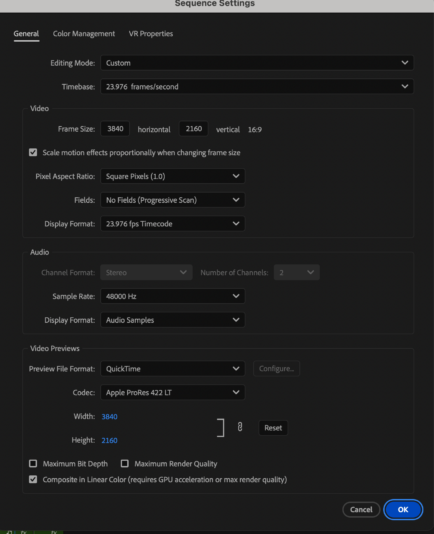
    Can you give us the details of your sequence settings, and if possible, can you attach the exported video, a screen grab, maybe?

  • Mary Gerber

    November 12, 2025 at 4:08 pm

    Thanks for considering. I have added a layer with our logo on top which renders fine. There has to be a setting somewhere that has been unchecked or checked by mistake. I typically don’t have this problem with motion graphic titles.

  • Mary Gerber

    November 12, 2025 at 4:22 pm

    FYI, I used “match source high bitrate” to export and it rendered fine. I haven’t had to do that before but I will now. Thanks

  • Roland R. kahlenberg

    November 28, 2025 at 8:27 pm

    Mary, thanks for letting us know how you solved this issue.
    Always good to hear when someone solves an issue on their own or with assistance from others.

    Best Wishes

We use anonymous cookies to give you the best experience we can.
Our Privacy policy | GDPR Policy