

Activity › Forums › Adobe After Effects › Mograph Templates for use in After Effects (not just Premiere)
-
Mograph Templates for use in After Effects (not just Premiere)
Posted by Darren Lee on January 30, 2020 at 2:28 pmHi, I have created a mograph template which functions well in Adobe Premiere.
However, I would like to use this template in other After Effects projects, but it does not display in my AE essentials panel (like it does in the Premiere essentials panel)
Is this because mograph template are for use in Premiere only?
Thanks
Darren Lee replied 5 years, 11 months ago 3 Members · 8 Replies -
8 Replies
-

Michael Szalapski
January 30, 2020 at 2:47 pmYou can use motion graphics templates in AE too.
See this page for workflow ideas: https://helpx.adobe.com/after-effects/using/creating-motion-graphics-templates.html– The Great Szalam
(The \’Great\’ stands for \’Not So Great, in fact, Extremely Humble\’)No trees were harmed in the creation of this message, but several thousand electrons were mildly inconvenienced.
-

Darren Lee
January 30, 2020 at 3:36 pmThanks, but that shows how to browse and use the template in Premiere.
Where am I looking for it in After Effects? The essentials panel seems to be where you build it, not reuse it
-
Michael Szalapski
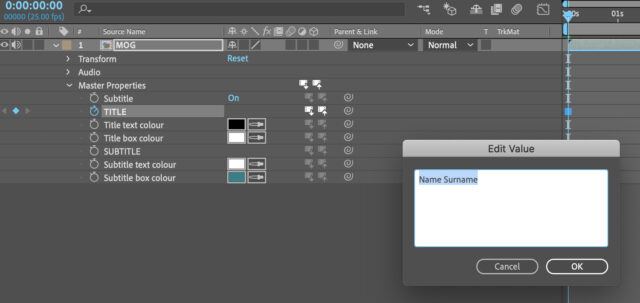
January 30, 2020 at 4:20 pmLook at the Master Properties section at the bottom of the page.
– The Great Szalam
(The \’Great\’ stands for \’Not So Great, in fact, Extremely Humble\’)No trees were harmed in the creation of this message, but several thousand electrons were mildly inconvenienced.
-
Darren Lee
October 4, 2020 at 10:42 amHello again, thought I’d come back to this old thread.
I’ve been using the same Mograph Template for both for Premiere and After Effects (via Master Properties) it works great
However, there doesn’t seem to be an option to select text formatting (Bold, Fontsize etc…)
Is it possible in After Effects? I’ve tried using expressions such as masterProperty(“TITLE”).font = “impact”; but that just sets the text content

-

Graham Quince
October 4, 2020 at 10:45 amIf you go to Window > Essential Graphics, you should be able to view the comp and see it’s master properties there.
For the Title property, I think there is a setting to enable font formatting in the edit options(?) checkbox. Then you’ll have more control
-
Darren Lee
October 4, 2020 at 10:56 amThanks – Unfortunately that sets it’s globally and not the single layer instance.
-
Graham Quince
October 4, 2020 at 11:09 amOh, no – you’re right. Wow, what is the point of that – well done Adobe!

I did find that when I was running an expression on the Text of an essential graphic, it was necessary to use a hidden text layer for the Essential Graphic’s source and have a second visible text layer point to the hidden one for it’s source. Maybe that could help here?
-
Darren Lee
October 4, 2020 at 11:13 amYes, that is one way of doing it.
Seems incredible that you cannot do this though, I’m struggling to even figure out in expressions!
Reply to this Discussion! Login or Sign Up