Creative Communities of the World Forums

The peer to peer support community for media production professionals.

Activity Forums Apple Final Cut Pro Missing/Empty Compound Clips in Timeline

  • Missing/Empty Compound Clips in Timeline

    Posted by John Fishback on May 24, 2024 at 9:47 pm

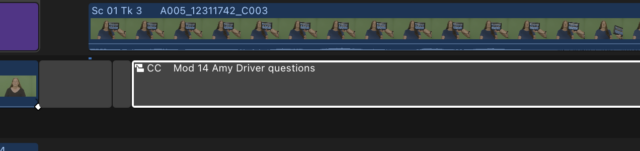
    I’ve never seen this before. A couple of days ago I finished the day editing, shut down FCP, and all was well. The next morning, I opened Final Cut and many compound clips (containing Titles) in the timeline were dark gray. The name of the CC was there, but none of the parameters or content.

    The CCs were in the Browser and if I inserted them into the blank CC, they opened up and worked. Only the transform parameters for the CC were missing. Before jumping in and trying to fix all the missing CCs, I restarted everything, trashed FCP prefs, and eventually reinstalled FCP 10.7.1, but nothing changed.

    Any ideas what happened? It took me a day to fix all the craziness. I’d like to avoid this happening again. Many thanks for your thoughts.

    John Fishback replied 1 year, 11 months ago 2 Members · 4 Replies
  • 4 Replies
  • Ben Balser

    May 25, 2024 at 12:31 pm

    First, make sure background rendering is turned off.

    Then, delete all render files.

    Only then would I trash the pref files.

    I’ve seen this once or twice, but many years ago.

    What macOS and FCPX versions are you running?

    Do you have the Chrome Browser installed?

    Also, try creating a new Library, new Event, new Project. Then in the original, select all and copy. Then paste that into the new Project.

  • John Fishback

    May 25, 2024 at 10:18 pm

    Thanks, Ben. I didn’t make the connection between Compound Clips and render files. It clearly makes sense. The OS is 14.1.2 and FCP is 10.7.1. Chrome is installed but rarely used.

  • Ben Balser

    May 27, 2024 at 2:53 pm

    Remove Chrome totally from your system. Here’s why.

    chromeisbad.com

    Also, I’d update to macOS 14.5, and you’re on the latest FCPX so that helps.

  • John Fishback

    May 27, 2024 at 5:51 pm

    Thanks. Never knew that. Knew Chrome was a memory hog, but not how it can slow down the machine. I mostly edit on an M2 Max with 32GB RAM and have experienced the mentioned slow downs. Chrome is now banned! Thanks again.

We use anonymous cookies to give you the best experience we can.
Our Privacy policy | GDPR Policy