Creative Communities of the World Forums

The peer to peer support community for media production professionals.

Activity Forums VEGAS Pro Match/Sync edits from Master Camera with other cameras

  • Match/Sync edits from Master Camera with other cameras

    Posted by Gary Orish on November 24, 2023 at 10:01 am

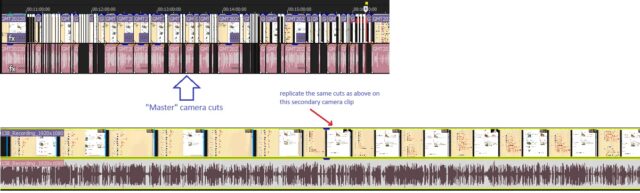
    I have a multiple camera shoot with all the clips sync’d together (and a separate audio file).

    What I’d like to do is to work through the master camera, cutting out all the unwanted footage (and possibly fading or using transitions between scenes).

    And then I’d like to load the other clips so that they align with the first frame of the master camera, and have all the cuts match up.

    Is that possible? Do I need an external utility (like vegasaur) or a script?

    The other alternative would be to load all clips at the same time and cut them all simultaneously. (The trouble is that I have up to 7 cameras and an audio track; and to make sure that all the cuts are exactly the same and all the clips stay exactly in sync with each other as they’re split or moved around is a nightmare and can easily go awry.)

    Another thought I had would be to generate an EDL and then somehow “impose” this EDL on each of the clips from the other cameras and on the audio track. And then I could possibly use nested projects (or render each one separately), one for each camera, so I can then work on a multi-camera version of the project.

    Any ideas?

    Gary Orish replied 2 years, 5 months ago 3 Members · 3 Replies
  • 3 Replies
  • Bruce Brent

    November 24, 2023 at 2:42 pm

    Gary, sounds like you’ve got your work cut out for you as you didn’t include the other six audio’s with the 6 cameras. Once all seven cameras are on their own timeline, it would have been really easy to sync up the audio’s with their waveforms. Then, just mute those 6 audio files. Now, it seems you’ll have to eye-ball the six with the master video and audio file.

  • Kelly Griffin

    November 24, 2023 at 8:33 pm

    Gary, I know you have a concern about stacking seven camera clips synced together, but I don’t think it would necessarily be the nightmare you’re concerned about, as long as you’re careful.

    I think just pay attention to making sure you have all tracks selected when you make the cuts, and keep an eagle eye on the post-ripple select/deselect.

    –Kelly

  • Gary Orish

    November 25, 2023 at 3:24 am

    SOLUTION:

    I came across a way of doing this by accident.

    Step 1. Make all the cuts and edits with the master camera clip (e.g. /raw/projectx/cam1.mp4)

    Step 2. Export the EDL.

    Step 3. Find & replace all “cam1” with “cam2” (or “camX”): /raw/projectx/cam2.mp4

    Step 4. Import the EDL.

    The timeline is replicated with all the cuts and edits, but with the another camera(s).

    The whole timeline could then be rendered – as input for a multicamera edit; or it could be copied into the master project as a number of tracks that get sync’d with the master camera.

    😀

We use anonymous cookies to give you the best experience we can.
Our Privacy policy | GDPR Policy