Creative Communities of the World Forums

The peer to peer support community for media production professionals.

Activity Forums Adobe After Effects Masking Problem??

  • Masking Problem??

    Posted by Jordan Day on March 2, 2009 at 2:54 am

    Hi,
    I have never had this problem before, but i seem to be having a problem with my masks. It seems to be not masking exactly what i have outlines, but a few mill to the side?
    Hopefully the screen shot i took will explain it a bit better, but im doing this for my major assignment, and i have sat for about an hour now trying to figure out where i have gone wrong..
    I moved the mask in the screen shot to show what is happening a bit clearer.

    This is really bugging me. Any help as to what could be causing this would be much appreciated.
    Thanks heaps,
    JD

    Edit – The top of the mask is where the problem is easiest to see… Please note that i purposly moved the mask so it does not line up with the actor to highlight the problem…
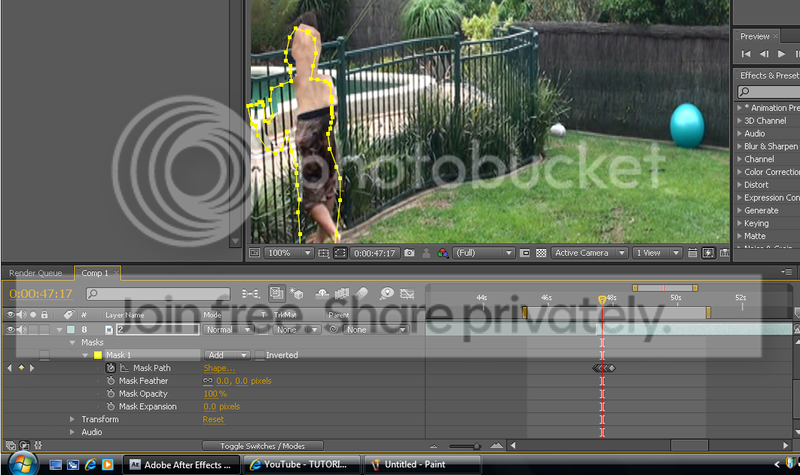
    Mask Problem

    Peter O’connell replied 17 years, 2 months ago 2 Members · 5 Replies
  • 5 Replies
  • Peter O’connell

    March 2, 2009 at 9:00 am

    Hi, I would recommend not tracking on the same layer as the footage, but rather on a solid above the footage. Then set the footage layer’s track matte to ‘alpha matte’.
    Pete O’Connell

  • Jordan Day

    March 2, 2009 at 11:28 am

    Interesting..
    I shall try that, thanks heaps mate
    Cheers,
    JD

  • Peter O’connell

    March 2, 2009 at 1:57 pm

    Hi Jordan, by the way in my first post I said tracking but I meant masking. I guess that’s what I get for responding at 4am 😉
    Pete

    roguekeyframe.com

  • Jordan Day

    March 2, 2009 at 4:53 pm

    Haha, no worries..
    Just wondering, as i want to alpha matte the masked area to a solid layer with fractral noise (teleporting effect) would this still be possible to do? Even after i have already alpha matted the newely created solid to the original raw footage

    Thanks heaps for your replies..
    JD

  • Peter O’connell

    March 2, 2009 at 6:23 pm

    Hi, if I understand it correctly, I think what you would need is
    Layer 1. Solid with mask
    Layer 2. The footage with effect applied (set to Alpha Matte)

    Then bring this comp into another comp with a cleanplate of the footage.

    As an aside, although it is hard to get used to at first, for more versatility in doing compositing style shots in AE, precompose everything (especially mattes) and keep your project panel very organised.
    Pete O’Connell

We use anonymous cookies to give you the best experience we can.
Our Privacy policy | GDPR Policy