Creative Communities of the World Forums

The peer to peer support community for media production professionals.

Activity Forums Adobe After Effects Expressions Left to Right Tiling of a specified Layer Size in HD composition size

  • Left to Right Tiling of a specified Layer Size in HD composition size

    Posted by Faizul Hassan on February 12, 2022 at 11:54 am

    Greetings;

    Need suggestions for a mathematical formula for layers/pre_comps of a specified size; that has to put in HD composition from Left to Right as tiling; and once width of one row is filled the remaining continuation of that layer/preComp to go to the next row and so on. And it would be great if one HD Comp is filled altogether. The rest of the last layer/PreComp to be continued to the next HD Comp. I think formula can be put in position property of each layer based on their index number. Here is the detail of sizes.

    MainComp Size HD = 1920 x 1080 px
    Layers/PreComps = 832 x 208 px

    All AE expression gurus are humbly requested.

    Thanks

    Hassan

    Faizul Hassan replied 4 years, 2 months ago 2 Members · 5 Replies
  • 5 Replies
  • Filip Vandueren

    February 16, 2022 at 9:47 am

    Hi Faizul,

    if all you want is to “wrap” the entire precomp to the netx line, then this should work:

    firstIdx = 1;
    i = index-firstIdx;
    w=thisLayer.width;
    h=thisLayer.height;
    numColumns = Math.floor(thisComp.width / w);
    // assuming the anchorPoint is at[50%,50%] and scale = [100%,100%]
    x= (0.5+(i%numColumns))*w;
    y = (0.5 + Math.floor(i/numColumns))*h;
    [x,y];

    But if you mean that when a third layer, which’ll only fit for the first 256 pixels, should be split in two and continue on the next line and so on… The problem is that an expression on position won’t be able to duplicate that layer to create the broken off part. Or am I making the problem too complex ?

  • Filip Vandueren

    February 16, 2022 at 9:59 am

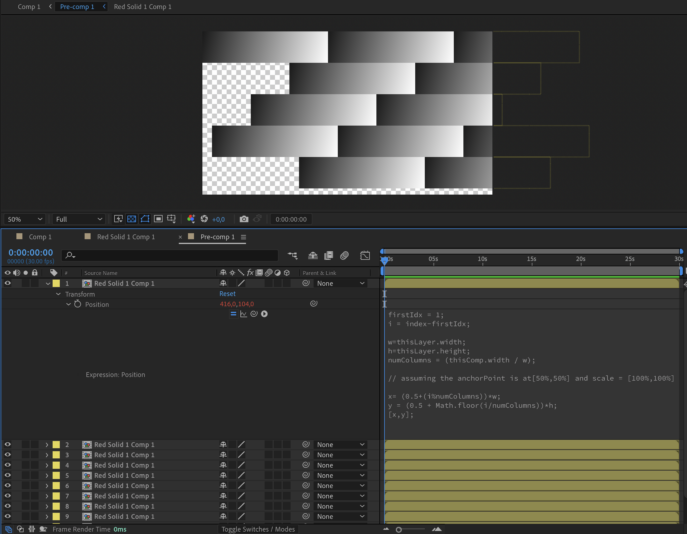
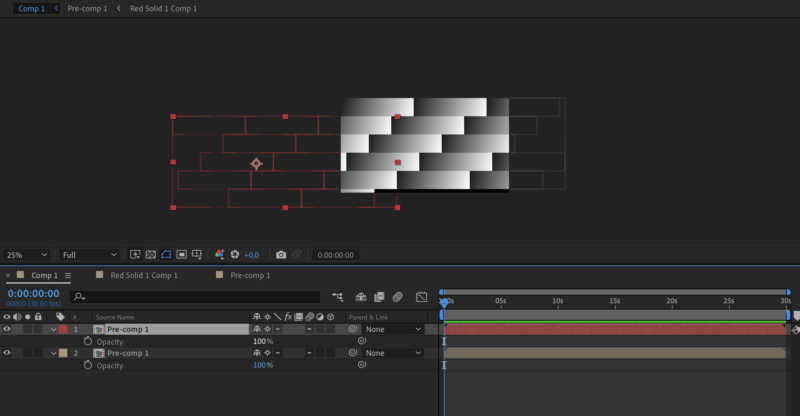
    Here’s a workaround to achieve real wrapping”, which needs a precomp (see photos in attachment)

    The expression is altered a bit (no rounding down of the numColumns), which causes some layers to go offscreen on the right:

    firstIdx = 1;
    i = index-firstIdx;
    w=thisLayer.width;
    h=thisLayer.height;
    numColumns = (thisComp.width / w);
    // assuming the anchorPoint is at[50%,50%] and scale = [100%,100%]
    x= (0.5+(i%numColumns))*w;
    y = (0.5 + Math.floor(i/numColumns))*h;
    [x,y];

    The second (red) copy of the precomp has collapse geometries enabled so layers outside of the precomp’s bounding box also become visible, and it is offset 1920 pixels to the left and 1 row-height (208pixels) down. That adds the stuff that overflows on the right back to the left on the next row.

  • Faizul Hassan

    February 17, 2022 at 4:52 am

    Waao, its great, Thank you very much; so nice of you. This is doing the stuff. only one thing more; what if we put different sizes of comp/layer as source, this is getting layer size of its own to snap with the last layer, i think it should take size from the last layer (if we want to put different sizes of layer).

    Again a big thank you for this help.

  • Filip Vandueren

    February 17, 2022 at 11:08 am

    Hello Faizul,

    it depends on wether the layers might have different widths, but all keep the same height, or if there is also some logic that needs to be applied to how a layoutr needs to shift when the heights of layers differ.

  • Faizul Hassan

    February 17, 2022 at 12:20 pm

    Layer’s Height is same for all variation; but sometime its width changes. I think its anchor point should be calculated from last layer’s width. And One more thing, what if we have to put more layers there and have to calculate the last line layer’s continuity? 🙂 pretty complex. Thanks for replying and helping.

We use anonymous cookies to give you the best experience we can.
Our Privacy policy | GDPR Policy