Creative Communities of the World Forums

The peer to peer support community for media production professionals.

Activity › Forums › Adobe After Effects › Keyframe property with range selector

  • Keyframe property with range selector

    Posted by Christian Haywood on November 3, 2020 at 3:27 pm

    Something I’ve tried a few times in vain has been to keyframe an animation property that also has a range selector. So with text, I would like each character to pop up, with some bounce back. If I were to animate this for one thing it would be 3 scale keyframes, 0%-110%-100%. When animating text with a range selector, it seems I can only select either the first, or last scale, with no bounce. Is this possible?

    Just for full clarification I’d like the range selector to go from the start of the sentence to the end, as per, but each character to go from 0% scale, up to 110% scale, then back to 100% scale, and preferably with bezier keyframes. Hope that all makes sense!

    Graham Quince replied 5 years, 10 months ago 2 Members · 1 Reply
  • 1 Reply
  • Graham Quince

    November 4, 2020 at 10:03 am

    Linear is After Effect’s range selector expression. You need five elements and it looks something like this:

    linear( animatedValue , animatedValueLow, animatedValueHigh, PropertyLow, PropertyHigh)

    It’s a really useful expression, but for your described outcomes, there’s a simpler solution.

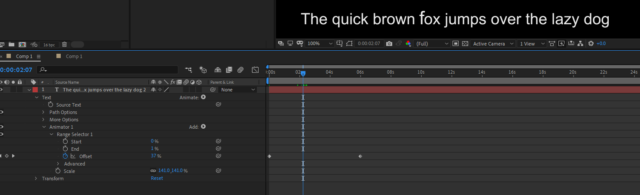
    1) On your Text properties, add a Scale Animator

    2) In Animator 1, set the End value to 1%

    3) Keyframe the Offset property from 0% to 100%

    4) In the Scale (not the layer’s scale) set the scaling to 110%

    When you play this back, you’ll see the text animates up and down. If you then expand Advanced, you can set easing values as a percentage.

We use anonymous cookies to give you the best experience we can.
Our Privacy policy | GDPR Policy