Creative Communities of the World Forums

The peer to peer support community for media production professionals.

Activity Forums Adobe After Effects Issue with Stroke around Typography

  • Issue with Stroke around Typography

    Posted by Armand Bakx on October 24, 2025 at 12:37 pm

    Hello,
    I’ve ran into a small issue while applying stroke Animators on certain type layers.
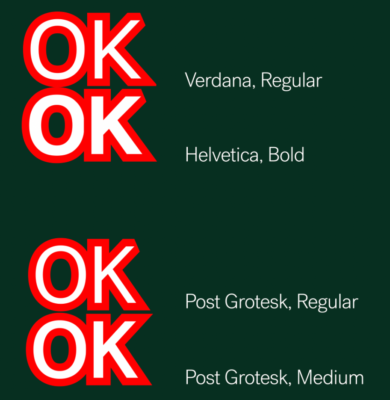
    It seems that on certain typefaces, or only certain weights of certain typefaces, the stroke doesn’t generate correctly on some letters. In the example here it’s the top end of the ‘K’ that gets tapered in a weird way.
    When converted to shapes in After Effects, the clipping of the stroke disappears. I don’t know what about it being a type layer makes it behave this way. When converted to shapes in Illustrator the typography seems like it shouldn’t have any issue to draw a curve around it, there are no double vertexes or other weird inconsistencies with it that would.
    This project needs to work with editable type-layers, so converting it to a shape layer is not an option.

    Does anybody have any experience with this? Know of any ways to resolve this issue?Any help would be much appreciated.

    Thanks in advance! 🙏

    Armand Bakx replied 3 months, 1 week ago 2 Members · 2 Replies
  • 2 Replies
  • John Martin

    October 24, 2025 at 4:08 pm

    Hey Armand, have you tried using minimax?

  • Armand Bakx

    February 3, 2026 at 1:19 pm

    Hello John,

    This is a very late reply, my apologies. I checked the Minimax effect, but it won’t be a solution for this project. Thanks for the suggestion!

    I flagged it in the Adobe After Effects Community and it’s been reported as a bug, hopefully their Product team will pick it up and solve it in consecutive editions of After Effects. It’s still present in the current edition of AE2026.

We use anonymous cookies to give you the best experience we can.
Our Privacy policy | GDPR Policy